
Join SurveySpot To Make Some Extra Money
We’ve been with SurveySpot for over a year now since joining Surveyspot. Our first check was received March 15th, 2007 for $28. Since then I’ve been able to earn a pretty steady extra few bucks for just a few minutes of time. Not to mention free samples and got paid to try a few products.
Take Surveys with SurveySpot
Many survey sites are pretty dodgy and claim to pay you, but never do. Or maybe pay you once then just start spamming you. In a year of use, I’ve never had such problems with Surveyspot.
There are quite a few reasons to join SurveySpot:
Minimum Payout $5. This should only take 1-3 surveys to reach. I’ve found most surveys are $3-5.
No SSN/credit card. This is one of the few websites that pay me without asking for a social. Of course never join a survey site that needs your credit card information. Some continue to charge after you cancel!
The More You Take. It seems the more surveys you take, the more often you get them.
Payment History
Survey sites can be shady and I would never promote it without confirming I’ve been paid. So I took a screenshot of my payment history. For the last year you can see that in the last year I’ve earned $267. I can definitely confirm I haven’t participated in every survey and generally don’t take long surveys for the big $. That brings our all time total to $525.

Our good friend Sir Jorge is also a big SurveySpot advocate and has shared his payment status with us. He’s been with SurveySpot from October of 2006 – Sept 2008 and earned $509, including some Amazon money he earned through a particular set of surveys.

Are you getting paid for your opinions on surveys? Join SurveySpot today. Make sure to confirm your email to start getting your surveys.
Need Post Ideas? Browse Your Keywords
Thinking of new ideas to write about everyday can be time consuming and difficult. I’ve been working on BAYB for coming up to 2 years this November. Sometimes it can be trouble to come up with new posts. So today I spent some time browsing the keywords people used to find this blog.
Use Your Keywords
People are using these keywords to find your blog, so it obviously that people desire whatever knowledge it is. Looking at my keywords several people found us through searching for information on Logical Media, NeverblueAds, John Chow’s Blog, Squidoo, and Mylot. Right there, I have found 5 different topics to write a blog post on.
Using that method can not only can further help your SEO rankings and bring more visitors to your blog with these keywords, it can also give those potential readers exactly what they are looking for.
Target New Keywords
By looking through your keyword list this can also show you what people are NOT searching for. Are you targeting specific keywords or phrases? Maybe it’s time for a follow-up post about your favorite affiliate program to try to drive visitors to your blog that way.
We put together the Bloggers Guide to SEO, which is a great place to get started.
How to Build Your Keyword List
Maybe I should tell you HOW to find the keywords people are using to find your blog. If you have Statcounter or Google Analytics installed, you are already a step ahead. If you don’t, do it now!
Statcounter will show you the last 500 visitors to your blog. To find the keywords they used to find your blog, go to Keyword Analysis on the side. This will display all the keywords used for the past 500 subscribers.

If you are looking for something a bit more longterm, you should use Google Analytics. You can set it up to any time period, the default setting is the past 30 days. Then go to Traffic Sources, and then to keywords. You can view the full report or just most popular 5.

What Stat Counter Do You Use For Your blog?
A new feature I am introducing is a poll on the sidebar. This is just to gauge the BAYB readers to see what they think about whatever question I post.
I suggested which stat tracker to use. Our pick is Statcounter, I have it on all of my blogs. What was most popular on the poll?
Poll Results
Out of 22 votes, Statcounter ended up being most popular. 36% use Statcounter for their stat tracking.
Our second choice was Google Analytics, which tied for second with Sitemeter at 22%.
13.6% chose all of the above, while 4.5% chose other.
It was surprising to see that 0% used Awstats as their primary stat tracker.
New Poll
Do you own a blogspot blog?
OIOPublisher Goes Down, So Does My Blog
Update
After installing a clean version of OIOPublisher all is back to normal! 🙂
You may notice that our ads are gone due to OIOPublisher causing problems. I first noticed a problem when I was trying to log into Free Sample Deals. There was an error from OIOPublisher.
Then going to BAYB I noticed all of our comments weren’t right. I suspected it may be OIOPublisher causing the troubles. I tried upgrading. Instead, that made everything worse and I couldnt even deactivate the plugin.
After removing the plugin completely all the errors were gone.
Has anyone else been experiencing any errors caused by OIOPublisher?
Arthemia Magazine WordPress Theme
Although I think magazine wordpress theme’s are pretty cool and a nice addition to certain blogs, I’ve never had much use of them until now. After launching my online portfolio site, Matthew Henrickson, I went in search of magazine themes. After I tried out Mimbo and didn’t like it, I found Arthemia, and had to look no further.
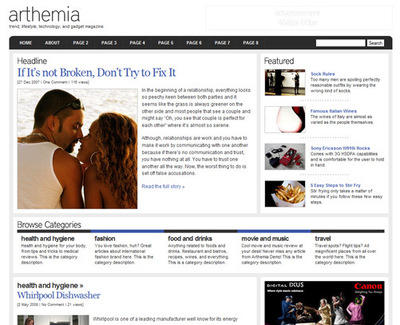
Arthemia Theme
Arthemia lets you have a headline post as well as featured posts along the right side. Under that is where you can put categories then a three column blog.
It does however take a lot of customization, patience and time to get it looking the way it is supposed to.
To get the headline and featured categories to work you need to name two categories headline and featured, then specify it in the theme editor. The other categories also take some work to have them display after your featured posts
Custom Thumbnails
This part of the process was especially difficult for me. The theme has a built in image resizer, which comes in very handy with this theme, since there should be a designated image for each post.
There is a folder in the theme called scripts which you need to edit the folder attributes to 777 using your FTP client (you also need to change the folder “cache”). Please note that if you have Bluehost or Hostmonster that you can not edit these folders to 777, it won’t work. Knowing this ahead of time will save you a lot of time.
Make sure to read the authors release page which also includes a FAQ, some tips as well as 500+ comments to sort through.
Arthemia Premium Theme
I use the free theme, because I can’t shell out $70 for a theme, so I got a lot of the headache of trying to make the free one work. The Premium Arthemia is mostly on auto-pilot doing a lot of the hard work for you. There is about 20+ features that is listed on the purchase page that sounds great and definitely well worth the money. If I had some extra cash laying around I would of definitely gone with the premium theme, and recommend buying it, I’ve seen many WordPress users get frustrated with the free version. You can buy the premium version at Color Labs Project.
You can see the comparisons between the free and premium versions.
Download Arthemia | View Demo
Contest Roundup: September 14th
Some more contests for you and your blog. Let’s go:
Top Commenter Contest
Be the top commenter at ILovePhotoblogs.com during the month of September and you could win $25! To enter you have to subscribe to his RSS feed by email.
Cash from Goof Blogger
Three cash prizes are waiting for you at Goof Blogger ($25, $15 and $10). Gain as many points as you can by doing different tasks.
Ends on September 30th.
Cash and Entrecard Credits
Join this easy contest at Money Online. Cash, Entrecard Credits and free advertising space for you. Subscribe and write a post about it to gain more entries.
Ends on September 15th.
If you’re looking for blog contests, if you want to promote your own competition, don’t forget to visit About Blog Contests!
Web Design Development Tutorials
Yesterday I introduced my design team and mentioned I didn’t really have any design talent. WebDesignDev has plenty of tutorials and articles dedicated to web design.
Web Design Dev
 WebDesignDev was created by Michael Dunlop who also blogs at Retire at 21 (read our review here). When I first looked at Web Design Dev I wasn’t too impressed until I started going browsing.
With nearly 1,000 rss feed readers, this website is very complete. There aren’t very many tutorials (about 30) but the ones that are there are very detailed. They are all thorough with screenshots, which is something I think is important when trying to teach someone something. You can read tutorials on creating flash websites, photoshop, and dreamweaver.
I think I am most impressed with their create a website page. Its the ultimate guide for creating a website, from buying the domain name and hosting to actually marketing the website. That page could be a website by itself.
Update Me
From the website to the forum, it needs updating. The last tutorial was posted July 22nd and several of the forum topics are a month old. It seems whatever initial buzz this site received is now gone and needs a pick me up.
With the web developement category with only one post, I think this site has great potential to opening up their reviews a bit toward WordPress theme installation and editing as well as more. Some themes are already visual enough you don’t need to design your own. It could really open it up as not only a web design resource, but ultimately a top blogging resource.
Submit Your Tutorials
A cool option that WebDesignDev offers is submitted your own tutorial, you can even get paid for it.
Write a tutorial for WebDesignDev and get paid $100 per tutorial published! Learn more…
Before you write your tutorial make sure to contact Michael that this offer is still valid. Not a bad way to make $100.
My Banner Design Team
I have no graphic talent whatsoever which makes it a bit harder to be a blogger. There are lots of times that I would love to create my own image for a post or feature on the blog. So to get banners made I have to hire a few bloggers that I think does great work.
Mark from Me and My Drum
 I keep telling Mark to set up a portfolio of his work. He mostly works on word of mouth, so I’m spreading a bit more of a word for him. I needed 125×125 banners made from Mark and he delivered with several buttons that I still use today. Now I am trying to convince Mark to make a header for Contest Live.
He just remade his blog with the WP-Vybe theme and a stunning new header. Get in touch with Mark and tell him BAYB sent you!
Visit Mark at Me and My Drum
Kim from JA Blog Graphics
Kim has a great portfolio of all her banner work. She even updates a blog posting the new banners as well as a link to the customers website. So not only will you receive your banner but possibly a free link as well.
Here are the banners that were made for me:


Take a look at her pricing, it’s very affordable. For a static 125×125 button you will only pay $5. For bloggers 125×125 buttons are so universal you can use it for anything, advertising, Entrecard, or Project Wonderful.
Visit Kim at JA Blog Graphics
Karen C from A Blog of Goodies
 I’ve mentioned A Blog of Goodies several times lately. I had noticed she had made some buttons, so while waiting for Kim’s buttons and forgetting about Mark’s work, I asked Karen to make one for Contest Live. I was very pleased and surprised at how much I liked the button and how fast she made it for me.
I don’t know if she officially makes banners for money, but she may do some work for a few bucks.
Do you do design work? Fill out your portfolio and do some work for us and get featured!