
What is Bounce Rate?
The term “bounce rate” may be thrown at you sometimes when someone is discussing how successful advertising or a promotion might be. But, What is Bounce Rate? I never knew exactly what it was, but I figured I didn’t want anyone “bouncing” off our blog. So the lower % the better.
Bouncing off your Blog
What does Bounce Rate actually mean? Well the question was asked, and answered on the Bloggeries Forum. Jay of Online Opportunity handled the question very well.
A bounce is when a visitor lands on one page of your site, and doesn’t visit another page in your site.
They could, potentially, look at that one page for a very long time, and still be considered a bounce.
Bounce rates basically measure how interesting other pages of your site are to your visitors. Depending on what your site is, you may or may not be worried about bounce rates.
A site that has product reviews, for example, might have a high bounce rate if the single page that someone lands on answers all their questions about the product so they don’t need to go anywhere else on the site.
So What Does Bounce Rate Matter?
Well for some things it doesn’t. I would assume visitors searching for your site via google etc, may bounce more, after they find the answer or query they are searching for.
Bounce rate may also effect which advertising opportunities you wish to pursue. If you are getting a lot of hits from a certain advertising opportunity, but they are leaving your page without clicking other pages of your site, that may be of less valuable to you.
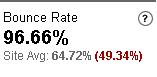 It may also influence which social media sites you want to promote your content on. When we were dugg our bounce rate was at 95%+, which meant that many of the users visited our digg page then left, probably never to return again.
Finding your Bounce Rate
The only tracking system that I know that calculates bounce rate is Google Analytics. Analytics is easy to set-up on your blog, it only needs a simple code. After the code is added you can explore tons of stats that include bounce rate.
Do you pay attention to your bounce rate? If so, what is it? Make sure to share it with us and the Bloggeries Forum.
January 2008 Stats and Earnings
I skipped last month’s report due to some time issues. Here’s checking back in to how BAYB is doing.
Traffic
According to statcounter, our traffic was 11,887 unique visitors. Stumbleupon and social media, along with google has help us pick up our monthly visitor total.
RSS Feed
Our Rss Feed count has been pretty much the same. Our high has been about 580. We aren’t keeping on track with the recent increase, probably due to the fact we haven’t run many promotions. I’ll try to roll with something next week.
Popular Articles for January
- Affiliate Marketing with Incentivizable Campaigns
- Social Media Could Put You on the Map
- Search Engine Traffic Is Easy With Tech Support Posts
- Optimize your Google Adwords PPC Campaigns
Earnings
Google Adsense: $13.05
TLA: Another big 0
Sponsored Reviews: $156
Direct Review: 45$
Private Ads: $132
Scratchback: 20$
Kontera: 3.12$
Project Wonderful: $12
Pepperjam: 40$
That brings the grand total up to 421.17$. Which is an increase of the last few months, but a lot of it has been an increase in affiliate earnings. I hope to keep up the earnings, as well as earn more with my other ventures.
How did you do last month?
The New Weekly Contest Roundup
Hi everyone! Today starts a new version of The Weekly Contest Roundup. I’m gLf from About Blog Contests and I’ll try to follow the steps of Contest Beat: the best and simplest blog contests from the net, weekly delivered for you all, here at BAYB. If you have a blog and if you want to easily win a contest, read on and find how to get free tech stuff and free money.
1 Year of Hosting
The first blog contest is from International Freebies. To celebrate her new domain name she’s offering a Professional Shared Hosting Package ($99.50 value) from Think411.com. This includes 5GB disk space, 25GB of Bandwidth and unlimited sub-domains. To enter simply write a post about this contest (100 words min, with link to the contest post, the site homepage and to Think411.com) and subscribe to her feed by email. Then leave a comment with the link to your entry. Nothing more.
Ends on February 28th.
A 40GB Media Player
Domprofessor’s marketing blog is giving away a brand new ARCHOS 504 Media Player (or $200 by Paypal, if you prefer). You have many ways to enter and gain points (more points, more chances to win!). You can simply write a few lines about his contest, add his site to your blogroll or Stumble/Digg one of his post. Check out the contest post for full details.
Ends on February 29th.
$25 Every Week
Finally, some cash! Mixed Marked Art is running a great weekly contest that will run forever. Write a one time post on your blog (250 words min, with link to the contest post and the site homepage) and you will have a chance to win $25 every single week of the year, plus a link to your blog. You may win only once per month. No deadline.
Comment Friday for February 1st
 This week stumble has been generous and set us up with a nice amount of traffic. This month we will definitely do a traffic and money earned check-up. I appreciate all the support and kind emails we’ve gotten recently, you guys are great.
If this is your first Comment Friday we give one lucky person a free weekly blogroll spot as our “blog of the week“. Along with that we are also giving that winner 100 entrecard points.
Last week we had great results with asking about interviews. We are definitely looking into bringing them back! This week I’d love to hear about how many blogs you have. Have you started your second blog, or more? If so which is your most recent?
As always tell us what articles you’d like to see here. Any questions are welcome!
Comment Friday is brought to you by Bidz.Com. The latest auction site to hit the scene. Get the perfect Valentines day gift at discount prices! (sponsor next week’s comment friday for 3$)
Optimize your Google Adwords PPC Campaigns
Pay Per Click “PPC” campaigns can be tricky. Sometimes the keywords you want to use are too expensive, or your quality score is low. When your score is low the keywords can cost as much as 10$ per click. If like me, you’ve had very little success with PPC, you should optimize.
Optimize Campaign
A new feature on Google Adwords is the campaign optimizer.
“The campaign Optimizer is a free Adwords tool designed to help you fine-tune your advertising campaigns.“

Since Google is picking your keywords and bids, usually you will get better quality scores for those keywords. Since the quality score is better, the bid on the keyterms is cheaper. After they set your bids, I have found that if you lower them you can still receive the decent quality score.
Guide to a Great Quality Score
A guest post on John Chow was exactly what I was looking for. Jonathan Volk wrote the guide to a great quality score. However, he didn’t mention the “optimizing” through Adwords he gave several other methods.
- Start your campaign fresh
- Break up your keywords
- Start your campaign bidding high
- Split test your ads
- Remove broad keywords
- Optimize the landing page
If it’s still not working for you, you can always switch to Yahoo or MSN!
Project Wonderful Review and Tips
Project Wonderful is another ad service that bloggers can utilize easily. It is another “wonderful” widget that is easy to use, for the most part. I took an “un-monetized” spot of our blog, in-between our Topspots and Blogroll and turned it into a money maker.
Project Wonderful
Project Wonderful is a great resource to use if you are having trouble monetizing your blog. If you are can’t fill your banner space, put in project wonderful until you can find a more permanent sponsor. Better than an “advertise here” button. By just setting your widget for a couple of cents per day, you can easily earn several $ per month.
You can place the widget anywhere. We have the widget on our sidebar, but some websites like 365toFreedom put it in every post. The ad sizes you can have include, 117×30, 125×125, 234×60, 468×60, 728×90, and 160×600.
A plus to it is that you can use the money you’ve earned and advertise with it. You can find several cheaper advertising for only pennies per day.
Some Wonderful Tips
When you set up your ad box, make sure you select a minimum bid. If you don’t you will get flooded with advertisers bidding 0.00$ and you will be essentially advertising their site for free. This is a huge hassle having to reset your ad. You must delete it then make a new one.
Starting with less advertising boxes could cause your price to raise. It can only helpyou to have more competition! Our minimum price set with one ad has been 50 cents, but has gotten up to 2$+. Remember it’s cost per day, if we could keep up 2$ a day that’s an extra 60$ per month. With more ad boxes available, your advertising can be sold for less. Every blog is different, however this is just what has worked best for us.
I’m big on incentive, possibly give your advertisers a reason more to advertise, than just the banner. Everyone who advertises with BAYB, usually gets a nice big stumble. Our current advertiser, http://getsomecomputerhelp.com/ got a nice stumbleupon boost of a few 100 visitors.
Has Project Wonderful been wonderful for you?
BloggingZoom Burning Bloggers
Blogging Zoom has definitely evolved into it’s own mini social media site. Many bloggers I know use it or have in the past. Getting to the front page is easy, everyone can always use a few extra visitors per day. However, has that gone to their heads?
Blogging Zoom Copy and Paste
Blogging Zooms submission process for new articles has always been a bit annoying. To submit every post you must write 350 characters of text. To get an idea how much that is, it would be almost two times bigger than the first paragraph of this article.
When I submit to social media websites I usually do so 2-5 at a time. That would be stumbleupon, sphinn, mixx, (sometimes digg), and blogging zoom. With submissions and writing my next article, I don’t have time to write 350 characters uniquely for blogging zoom.
The result, Blog about your Blog has been officially been banned by Dictator Vic. I’ve taken a lot of crap just for my submissions at Blogging Zoom. Our latest submission received two comments from Vic scolding me for “copy and pasting”. I noticed my article was the only one receiving attention for “violating the rules”. Then I was told to quite whining by a very nice user. After I told them to stfu, BAYB was banned.
Ooopps…
Double Content and Banning
I only have to assume that Blogging Zoom wasn’t ranking as well for terms or being penalized. Not only is their search system terrible, but they don’t show often in google either. I find it hard to believe it’s “for the blogger”. If it is for the blogger, how would you be helping them by banning them from Blogging Zoom. Sounds like someone is on a power trip.
By duplicating a few sentences of a post, I have never felt any penalties. By making it 350 characters long I suppose it could be a penalty due to it being so long. Blogging Zoom isn’t looking out for their bloggers, it sounds like they are looking out more so for themselves. It’s funny how this rule isn’t in place for any other social media site…
“Two main reasons why we do not allow copy paste. First reason is for the benefit of both Blogging Zoom and you as the blogger. Every time you copy and paste your content in a submission let it be here at Blogging Zoom or any other social voting site you are giving yourself and Blogging Zoom a duplicate content filter penalty with Google.
We ask you to please follow this rules. Not only are you hurting yourself with the copy paste but also fellow bloggers that do follow the rules but are also penalized with a site wide duplicate content penalty.”
After issuing the “no copy and paste” policy I know several of my own contacts have stopped using the service. Honestly for me I have a lot less of a desire to publish articles. Either the comments are rude and nasty, or I’m not writing my description long enough…
Comparison to Digg
I love that Blogging Zoom has compared themselves to digg.
“Blogging Zoom is heading toward one day being a much stronger site then Digg and any other social site. If you need proof of this look at our Alexa vs Digg we are month ahead in traffic for the same time of Digg. If you want to be a Power Zoomer and grow with Blogging Zoom please help the community.”
It’s nice to have a nice high goal set, but being bigger than digg? Get real. First off as a blogger, Vic you know Alexa is worthless. Secondly you guys are no where near digg. Possibly in volume of rude users. How are you helping the community by banning members who aren’t commenting on every post being an idiot?
I’m not one to be negative towards anyone, but like he’s done to many others, Vic (and Blogging Zoom), has just rubbed me the wrong way.
Can Blogging Zoom ever be the next Digg?
Out with the Old, In with the New Blogging Forums
Promotion and discussion on forums can definitely help your traffic as well as web presence. I’ve even tried to run my own forum however it proved to be too time consuming and difficult to fight the spam bots. The benefits of forums are great and I really wanted to tap into that area.
Instead I’ve tried to be active on several forums (as well as social media) because it’s important to branch out. Talking to other bloggers and conversing can really only help you expand.
Out with the Old
BloggerForum once was a great place for link exchanges, posts about new money making opportunities and a place to share your blog. They took some downtime figuring out a new way to fight the spammers. As they have re-emerged (I had no idea they were back until today) they are missing several key categories, as well as no easy way to search new posts. I was there several minutes without success.
PayPerPost Forum was a great place for me for a while. Lately their forum hasn’t become as blogger friendly, just postie friendly. My blog promotion and social media promotion wasn’t very well received the last few times. Stumble and digg requests go unanswered and blogging news needs constant bumping to keep it alive.
In with the New
Bloggeries forum has been very impressive so far. It’s one of the few “new” forums I’ve joined. Several seemed to pop up all at once. I’ve given Bloggeries forum a shot and it’s been pretty good. I’ve gotten to know the owner pretty well as well as converse with several members. The posts have already proved to be worth it, sending about 20+ unique visitors in just two or three days.
9Mb is a webmaster forum that is owned and run by Nomar. He is previously from KingNomar.com but that has been sold. The forum is a mini-digital point. They have a tight community of users who are frequent and active. It’s good for link sales, exchanges as well as blogging questions among other things.
Have you moved on to any of the new forums yet?