
2 Great Ways to Check Your Blog Health
You have a blog and you have been studiously writing useful posts and steadfastly replying to your readers’ comments. You have a good habit of linking to fellow bloggers and get delighted when someone links to you. You have also been working to get your posts to appear in search engines.
All these actions are very commendable and you will be rewarded for your efforts in time. But, it is good to check the overall health of your blog in terms of SEO, backlinks, Google Pagerank, etc. Here are a couple of ways to get a quick overlook of your blog’s health.
Website Grader
Website Grader is very easy to use. You just enter your blog URL, keywords you want to get metrics on and enter a  competitors website to get a comparison and hit submit. Website Grader crawls the web and gathers all sorts of information about your website and gives you a nice report with some suggestions to implement.
Some of the points, it reports on:
- Score: It gives you a measure based on all the other facts. Useful to compare other sites and yours over time as you implement improvements.
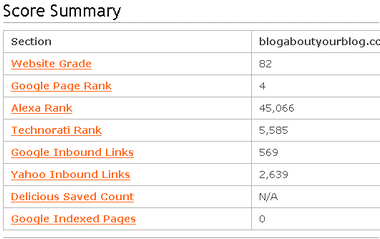
- Score Summary: This section gives you nice overview of stats like Google Pagerank, Alexa Rank, Technorati Rank, Google Inbound Links, Yahoo Inbound Links, Delicious Saved Count, Google Indexed Pages.
- Web Page Structure: Shows your current title, description and Meta keywords in use. Very important for SEO and has a link to a great article to learn more on this topic. Also, looks to see if you utilize Google Analytics.
- Domain Info: Shows you when and whom you registered with and when your domain name is expiring. It’s worth it just for that. Never let your domain name expire.
Plus, it also checks to see if you domain redirect enabled as search engines regard www.shankrila.com and shankrila.com as 2 different websites and you would be diluting your link juice. - Heading and Image Summary: Gives you a good idea about the headings and images a search engine will see in your site.
- Google Indexed Pages: It is pretty important to generate a Sitemap for your blog and submit it to Google so it can index your site. You can also see the pages in Supplemental Index as a high number might indicate duplicate content in your site. WordPress blogs encounter this often as there are more ways to get to post and Google doesn’t know that.
- Search Ranking: You can see how rank for the keywords you were going for if you are in the top 100. Or you will see a ranking of 100+.
- Pro Feature: You get all the above features for free but with a pro account you can compare your previous runs in this site to get a historical data. I think the free service is more than enough for most personal blogs.
For a free service, this tool is excellent and gives you a great overall picture of the health of your blog.
Xinu
Xinu is like Website Grader but it is more focused on providing a quick view of a lot of stats in one page in an easy to read layout. But, it provides fewer recommendations but more metrics than Website Grader.
Xinu was developed by an individual but the source code has been made public for anyone to use. It is available for download and it can be hosted by anyone. One such hosted spot where you can go to use it is Xinu Returns.
Let’s look at some of the metrics Xinu has to offer:
- Diagnosis: This is where you will see a few recommendations on your URL, title, keywords, description, html size, html tags and favicon.
- Domain: Your IP address, online time, author and country information.
- Ranking: Google Pagerank, Technorati Authority and Rank, Alexa and DMOZ ranking.
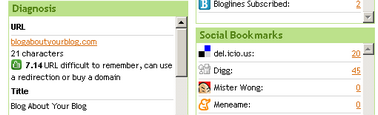
- Syndication: Shows RSS subscriber numbers, visitors and Bloglines subscribers.
- Social Bookmarks: Shows the number of your pages bookmarked in a few popular social bookmarking services.
- Validations: Shows XHTML, CSS and RSS validations and errors if any.
- Indexed pages: Shows number of pages indexed by Google, Google Images, Yahoo and MSN Live.
- Backlinks: Shows the number of backlinks for your blog as seen by a variety of search engines like Google, Yahoo, Alexa, Live, Technorati, Webcrawler, Clusty, Orange, Lycos, Altavista, AlltheWeb, Ask Jeeves, & HotBot.
As you can see, you can use Xinu alongside Website Grader and get a nice overview of your blog’s health. Writing great posts are essential but it is good to monitor the health of your blog periodically just to make sure you are in the right track.
I hate to repeat this cliche but a blog is like a living plant. You have to nurture it, water it, prune it and take care of it and over time you will reap the fruits of your labor.
I would love to hear your Website Grader scores and any qyestions you may have about increasing your scores and in turn the overall health of your blog.
I write about more technology related topics at ShanKri-la – where technology meets daily life!. My goal is to make your life on the Internet a little bit easier, a little bit manageable and a little bit more enjoyable.
Sphinn It
We’ve been Sphunn!
6 Spanking New WordPress Plugins You Haven’t Seen by K-IntheHouse made it to the front page of sphinn. This sent a nice flow of traffic. It was only the second article I submitted to sphinn, I just found this website. (not to mention the article also got 11 delicious saves, as well as several stumbles!)
What is Sphinn?
Sphinn is another digg like site. Just like the rest you vote for the articles you like.
Categories include:
- Yahoo
- Microsoft
- Search Marketing
- Social Media
- Online Marketing
- Searching
With “blogging” somewhere in the subcategories.
I’ve already seen a few familiar faces on sphinn like Andy Beard and DoshDosh. It generally takes 10+ votes to hit the front page. If you have a worthy article, definitely submit it and give it a try to making the front page. We saw several 100 visitors from being on the front page.
Add Sphinn to your Blog
I went the route of adding sphinn to our feed flares on feedburner.
To do so all you have to do is go to https://blogaboutyourblog.com/sphinn.xml and copy that to a notepad and name it “sphinn.xml” From there go to your FTP program and upload the file to your server.
Then login to your feedburner account and go to the optimize tab. Under feedflare go to “add new flare”.
Enter the URL http://yourdomain/sphinn.xml Of course replacing “your domain” with… your domain.
From there you can add sphinn directly to your website or just to your feed.
Now you are ready to be Sphunn!
Triple.Com Review with a Special Offer
Triple.com is a newer domain registrar. They have been offering several promotions that I want to tell you about.
Triple Thoughts
First thing is they have a great domain name! The design is pretty simple, but thats good. No ads plastered all over my screen. They have some pretty good offers that I have already taken advantage of.
Two Free Domains for Registering
“This week only” triple.com is offering a 20$ sign-up bonus! That can either help you with some hosting, or you can go ahead and purchase two domain names like I have. I registered for my 20$, which was very fast and easy. Registering a domain was even easier. Now just to develop it and add some content! Don’t miss out on being able to register domain name for free.
Welcome dear customer!
Triple.com – is new domain registration service, hosting and SSL certificate provider.
Our goal is to provide you the best service by the world’s optimal prices.
For now we are in setup process with some major features, but domain registration is working absolutely fine. As a gratitude for your attention and support we are glad to grand you with 20$ free bonus. Please go to the Add Funds section and add $20 to your account free of charge!
Cheap Webhosting
Triple offers some pretty cheap webhosting at only 4.99$ per month. Very important with hosting they offer great support. They guarantee 24/7 support as well as 99.9% uptime. Other features include:
- 30-Day Money Back Guarantee
- Data Protection
- Best-of-breed routers, firewalls & servers
- Weekly Server Backups
- UPS Battery Backup
- Diesel Generator Power Backup
- 24/7 Network and uptime Monitoring
- 24/7 onsite physical security
Set Yourself Apart
Besides the great 20$ offer there isn’t much difference than other domain registrars and hosting companies. I would try to add another element or offer something unique. It would be interesting to see a domain registrar promote some of the domains that are purchased through them.
Comment Friday Winner: Blisslogs
This weeks topic was promoting your blog offline. I have just taken steps into promoting BAYB offline with our new t-shirts. No I’m not a professional model, but thanks for asking. I hope this is just the start of our offline campaign with other things in the works. Stay tuned!
I got comment friday up a little late yesterday. My week goes so fast sometimes I forget what day it is. Note to self, stop drinking on fridays!
I want to wish Jason a happy birthday (again) and award him as our blog of the week. He runs a pretty decent blog over at blisslogs, and I don’t think he gets enough readership over there. If this will convince you, he also has a top comment list which you can easily get a free link for commenting on a few posts. Stop by and check out what he’s got.
This is our second weekend post. Do you post on the weekends?
Is It Worth Posting On The Weekends?
A question I’ve seen more of recently, and one I’m coming around to answering as “No, not really”.
Now obviously I’m talking more about blogs that are aiming for traffic, ad-clicks, Stumbles & Diggs etc. because if you’re blogging simply for fun and maybe a smaller group of readers I don’t believe it matters. Othewise though, are you neglecting your family to publish posts at the weekend, that would serve you better by putting them up on a weekday?
It’s something I’ve noticed with my own blogs as the months go by, that traffic and comments left decrease markedly over the weekend, before picking up again during the week, when everyone goes back to work – or at least to use their employers internet connection for browsing! I’ve also noticed that if I don’t post at weekends, it has no real effect on overall traffic for the week, but if I slacken off during the week, then traffic, return visitors and active FeedBurner subscribers drop noticeably, and can take time to recover.
From manically posting every time I got the chance as a newbie blogger, I’m now more relaxed about the weekends, and should I log on during Saturday or Sunday to write a longer post, I’m more likely to timestamp it to appear during the week, than hit publish straightaway. If I do publish during the weekend, then it tends to be a round-up post, or something equally simple. I’ve come to the conclusion that long, in-depth articles published over the weekend, tend to get ignored for the ‘fresh stuff’ that you then post on a Monday.
So, how about you? Do you post on a weekend, or save it for the week? Do you think it matters, or is it not an issue? I posted this on a weekend to see what happens….
(PS Did you notice that the post title and the URL are different? If you want to know why, I’ll tell you how & why on my blog.…. 😉 )
Comment Friday for August 17th
 It’s another Comment Friday here at Blog about your Blog. Apologies for the late start.
The “rules” are simple. Just leave us a comment about anything you want. I will select one commenter that really stands out to give a free link to, as well as a spot on our blogroll for the week.
Do you have what it takes to be the blog of the week?
Yesterday I posted about the release of Blog about your Blog T-shirts. Have you promoted your blog offline? If so in what way?
Don’t forget to “plug” your favorite articles. You don’t have to register to vote.
Get Your Blog about your Blog T-Shirt
I have been looking to make Blog about your Blog t-shirts for sometime now. I designed a t-shirt from our header. You can own your own at the BAYB store.


The price is currently $16.00 for a t-shirt, which is as low as I can make it. I am looking for other ways to produce t-shirts, but this is good for now. If we can sell 10 t-shirts, I will be giving one away FREE!
For a limited time, printfection will send you your custom t-shirt for only 2$. My shirt ended up costing about 10$ with shipping and as you can see, I am very pleased with it.
I think I need 6 more shirts, so I can wear one everyday.
A Review Of coComments and co.mments
Written by Mark MeAndMyDrum | Fave MAMD | Subscribe to MAMD
Whatever your reason for leaving comments on other blogs is, no doubt you have found it a bit of a challenge to keep track of them all. “Did someone respond to my comment?” “Where did I comment?” “How’s the conversation coming along?”
Sure you can subscribe to all the places that offer that feature, but wouldn’t it be better to have them all in one place?
Worry no more. I’d like to compare two tools designed to help you keep track of your comments, saving you time and keeping your sanity. Walk this way, won’t you?
co.mments
As you surf the Web and find something to comment on, you click the bookmarklet from your browser’s toolbar to start recording the conversation. You can either return to your account to view how conversations have developed or you can receive emails as the conversation grows. Clicking this bookmarklet will provide you with a brief confirmation in the form of small window that will quickly fade away.

Not feeling sociable? That’s all right. Just click the bookmarklet anyway and watch the conversation without participating.

What I like about this tool is it doesn’t get in my way. And as can be seen above, the interface used to view the comments I track is very clean. I’ve configured it also to email me when a new comment has been made. It’s rival below doesn’t do that at this time, but they’re working on it.
Rating ****
coComment
I really want to love this tool — I really do. But I do find it a bit irritating at times. Okay, I do find it that way a lot of the time. It’s integration is clever and automatic, but it’s also slow to the point of not allowing you to make a comment at all.

It adds a little toolbar beneath comment boxes on blogs you visit (and even some sites and forums). Choosing to track a comment is easy: just check the box. When you do, the blog you’re on is documented in your account where you can return to see how the conversation has developed.

The trouble I’ve been having with it is that it just takes forever to connect, if at all, to the coComment server. Unchecking the option to track the comment doesn’t seem to help either, so I’m left with just disabling it. 👿

One strong feature is that it does offer a nifty sidebar in your browser allowing you to click on blogs you’ve visited and view the conversations in the right side of the window.
It also offers a widget to display on your blog to show your readers what you’re commenting on. It may sound cool, but, IMHO, if you have time to live vicariously by watching someone comment elsewhere, then methinks you have too much time on your hands. 😉
Another characteristic of this service is that it is definitely a community just like MyBlogLog in that you can keep track or your friend’s comments, and start or join groups. Nothing wrong with that.
If it weren’t for the disappointing “get-in-the-way” behavior it gives me, I’d give it a 5-star rating. Alas, I can only muster a 3-star.
Rating ***
So if you’re looking for an easy way to keep track of your comments or want to monitor other people’s conversations, then I recommend using co.mments. But if you’re more into tracking your comments, joining groups, adding friends, and what not, then perhaps the coComment service is more to your liking.