
My Banner Design Team
I have no graphic talent whatsoever which makes it a bit harder to be a blogger. There are lots of times that I would love to create my own image for a post or feature on the blog. So to get banners made I have to hire a few bloggers that I think does great work.
Mark from Me and My Drum
 I keep telling Mark to set up a portfolio of his work. He mostly works on word of mouth, so I’m spreading a bit more of a word for him. I needed 125×125 banners made from Mark and he delivered with several buttons that I still use today. Now I am trying to convince Mark to make a header for Contest Live.
He just remade his blog with the WP-Vybe theme and a stunning new header. Get in touch with Mark and tell him BAYB sent you!
Visit Mark at Me and My Drum
Kim from JA Blog Graphics
Kim has a great portfolio of all her banner work. She even updates a blog posting the new banners as well as a link to the customers website. So not only will you receive your banner but possibly a free link as well.
Here are the banners that were made for me:


Take a look at her pricing, it’s very affordable. For a static 125×125 button you will only pay $5. For bloggers 125×125 buttons are so universal you can use it for anything, advertising, Entrecard, or Project Wonderful.
Visit Kim at JA Blog Graphics
Karen C from A Blog of Goodies
 I’ve mentioned A Blog of Goodies several times lately. I had noticed she had made some buttons, so while waiting for Kim’s buttons and forgetting about Mark’s work, I asked Karen to make one for Contest Live. I was very pleased and surprised at how much I liked the button and how fast she made it for me.
I don’t know if she officially makes banners for money, but she may do some work for a few bucks.
Do you do design work? Fill out your portfolio and do some work for us and get featured!
Using Performancing Ads with OIOPublisher
After blogging about Performancing Ads I never made much use of it. I left it on the sidebar for less than a week and just moved on. Why run Performancing Ads when I have OIOPublisher? Now you can do both.
Perfomancing Ads with OIOPublisher
Performancing has made it easy to get your ad code for whichever region you want. You can add this code to OIOPublisher or directly to a blog.
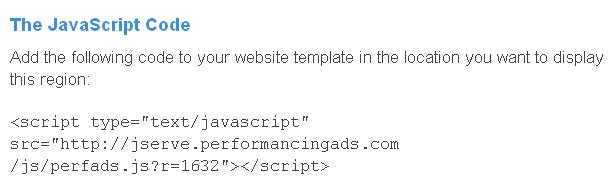
After you get the code you can go to your OIOPublisher dashboard and install the code into your default ads. You need to change the defauly ad as HTML. From there just copy and paste the code they have given you.
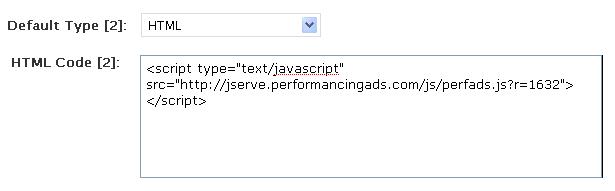
This is a bit of a hassle as for every box in OIOPublisher you need to create a new region. As always with Performancing the first box is always “advertise here” which I also don’t like. I don’t want to send advertisers to sign-up there to buy an ad from me, I want people FROM Performancing to sign-up for my ad. Otherwise I could do the advertising myself.
However, this little tip may be great for your blog if you aren’t getting enough advertisers. Thanks to Rockfuse for posting about it.
Make Money With PerformancingAds
Buy the OIOPublisher Plugin
Heckler Contest Winners
Thanks to everyone who participated in this contest. We only had one DVD to giveaway this time, but if you didn’t win, you can check it on Amazon. I’ve viewed it and thought it was pretty good movie, the best was the actual Heckling.
Winners
Heckler DVD: DR Wright
Autographed Jamie Kennedy Cap: Caffinephil
Thanks again to all the participants!
When Networking Fails…

To successfully network a blog with other blogs in your niche can do wonders for your SEO, traffic and overall branding. I had that idea with Contest Live. Its the only active contest voting network and with so many contests going on daily, I thought it would be a perfect resource for bloggers with contests. After getting set-up with the website and content up I began contacting the blogs on the Top 20 Blogs list as well as several others.
And The Result Was…
Well it was sad. I got one response declining link exchange and that. One actually asked a bit more about Contest Live, but that was two weeks ago, with no response since.
As BAYB has become a great place to find contest blogs as well as our weekly contest round-up, I not only envisioned Contest Live as a place for contests, but also a place to find other great contest blogs.
So how do I attain that with a failed networking campaign?
Attraction with Contests
To get initial buzz and visitors, sponsoring contests has been a huge boost. I have sponsored entrecard credits and advertising space for Contest Live. I’ve been able to balance links to Contest Live as well as the blog.
Getting set-up as a sponsor was a lot easier than I thought. Some contests were already in progress and I caught them early enough to throw in an additional prize. Ive also contacted people who are looking to host a contest and get in that way.
I even got my own contest featured at A Blog of Goodies and was able to pick up several great members and people submitting great contests.
We have a great guide 6 Tips for Hosting a Blogging Contest, which is a little old, but still remains pretty valid. I am looking to feature a few more contest tips upcoming.
Have you been able to use contests to further promote your website?
Contest Roundup: September 7th
Huge tech prizes today! With your blog everything is possible! And don’t forget the The New Jamie Kennedy’s Heckler Contest, few days left!
iPhone 3G
Yes, it’s true. Spread the Word Bloghology (a new magazine for bloggers) by using social networks and blogging about it: you could win an Apple iPhone 3G!
Ends on September 15th.
ASUS Eee PC
A brand new ASUS Eee PC 2G Surf Notebook is waiting you at Benjaminpatton. You have many options to enter and gain points. See original post for details.
Ends on September 30th.
Cash and EC credits
Simple contest from Bloganol with $25 plus 1000 Entrecard credits as prizes. To enter write a post about it in your blog, subscribe to his RSS feed by email and then leave a comment.
Ends on September 30th.
If you’re looking for blog contests, if you want to promote your own competition, don’t forget to visit About Blog Contests!
99 Cent Dot Com Domains at GoDaddy
 Sometimes when buying domains you could spend up to $10 per domain. With Godaddy I often use coupon codes so my dot com’s usually end up being around $7. Not bad, but when I found out this great new coupon code from Mike Huang formely of Bloggin-Ads I went ahead and registered another domain.
Final Price: $1.19
Godaddy has been running this promotion for a couple of days now, so I hope it’s still working. As I mentioned I registered a domain yesterday.
Use Godaddy coupon code test99 to get your 99 cent domain. After ICANN fee, it comes out to be $1.19. I believe this includes dot comes and dot net domains.
From what I understand is that this coupon code is valid once per account. So I imagine that people are creating several accounts to take advantage of this offer.
Can you beat $1.19 domains?
Win The New Jamie Kennedy’s Heckler DVD

Jamie Kennedy was great and sponsored a swag bag full of autographed Jamie Kennedy stuff. The prizes have been shipped out. He’s given me one more thing to giveaway. The Heckler DVD that is being released September 9th. This contest will be a little easier to enter and much shorter than the last, so don’t miss out on it.
Rules and Entry
There will be several ways to enter this contest.
- Subscribe to this blog via email (one entry)
- Stumble this contest post as well as Jamie Kennedy’s website (one entry)
- Vote and comment on the Youtube Heckler trailer (one entry)
- Follow Jamie Kennedy and Matthew Henrickson on twitter (one entry)
- Blog about this contest and link to the Amazon preorder page (three entries)
Make sure to leave a comment on this post stating what you’ve done… Otherwise your entry may not count. Unfortunately we can only ship to US at this time.
Prizes
One person will receive the new Heckler DVD that will be released on September 9th.
A runner-up will receive an autographed Jamie Kennedy cap.
Deadline
The deadline on this contest will be September 9th, 2008 at 3 PM EST. Winners will then be drawn and announced.
Add this contest to Contest Live.

Importing and Exporting on WordPress
A successful blogger is usually an authority in their niche. I wrote about using Yahoo Answers for more website traffic by responding to questions. Forums are the same way, so I always like to make my rounds and try to answer a few questions. The latest one was about combining two blogs into one. A great way to do that is to import your posts and comments.
Importing to WordPress
We had to import our blog from blogspot to our own hosted WordPress account, over a year ago. It wasn’t as easy it is now. We lost our comments and some posts didn’t transfer right. All is different now!
Importing is the easiest way to transfer content from one blog to another. It takes the posts and/or comments from another source, like RSS, Blogger, or Typepad. You can basically ‘combine’ blogs or simply move off of your Blogger host.
To get started login to your WordPress dashboard and select manage. You will see import. From there choose where you want to import from. If you chose to import from Blogger, you must login to your Blogger account to “authorize” the import. Then simply find the blog you wish to import and click.


Important Note Remember to delete or edit the posts from the source or that you imported. You don’t want to be penalized for a bunch of duplicate content.
Exporting from WordPress
If you want to export, maybe you want to move domains or just simply move what certain authors have written. You can do that by going to manage, then export.
WordPress Help
If you are considering moving from blogger (or any other platform) to a hosted WordPress and need help make sure to contact me. For a rate, I could either walk you through an installation or easily set one up myself. Stay tuned for more WordPress tips and tools coming soon!