
Installing a Contact Form for your Blog
To really be able to connect with your readers you have to be easy to contact. Not only that, but it easier for readers to ask questions, inquire about articles, and most importantly advertising terms can be made. We receive several contact form emails a week, without our contact page, I’m afraid that number would definitely suffer.
I am not very plugin competent, but even I could install the contact form. I found that the easiest contact form is the Secure and Accessible PHP Contact Form.
The steps are pretty straightforward. Just as any plugin you should download it, unzip it, and upload the file in a FTP program (I use filezilla) into your wp-content/plugins section. After you activate the plugin you are ready to set it up and configure it.
From there you need to the contact form page and select Configuration. Enter your email and other information, but you can’t enter the URL yet because it’s not created.
The next step obviously is to create the Contact Form URL. To do so go to “write” like you were going to create a new post. Then you must click “pages”. Enter in the title of what you want the Contact Form to be named. Ours is named Contact Us. After you enter the title make sure to save it. You won’t have any actual text within the page yet.
Now go back to the Configuration page and add the Url of your new page. After that, go back to your Contact page and enter the code
“<!–gb_contact_form–>”
From there you are pretty much finished unless you want to further customize your contact form.
One problem I ran into however was that I use multiple blogs with that contact plugin. Therefore I had to have two separate emails. I couldn’t use the same email for two different contact forms.
Comment Friday for July 20th
 Comment Friday is up on time this week! Hooray for that!
Since we have quite a few new readers let me tell you what Comment Friday is.
Comment Friday is a fun and simple idea. Just leave us a comment about the topic I mention, or really anything you want. From there we can get a great discussion going.
Each week we will chose one lucky commenter to be featured as our Blog of the Week and that blogger will get a permanent link to their blog in a post and a spot on our blog roll for the week.
Sound good? Those are the stakes and here is the topic. This week I am interested in hearing about what brings you the most traffic. Blog about your Blog has been trying to find ways to increase website traffic and I want to see what works for you.
Have something else on your mind? We want to hear that too!
Blog about your Blog is a winner!
The Prize Blog has chosen Blog about your Blog as their second day winner.
The prize is a Phillips 512MB MP3 Player. I was pretty happy to find out we are the winner, because what it means is we will have yet another great prize to reward our valuable and loyal readers with. Am I sucking up too much?
It’s not too late to win!
The Prize Blog is giving away even more prizes. You can still enter to win! There are 3 more days of prizes left. You can win a review of your website or a listing at the Bloggeries Blog Directory.
It’s easy to win all you have to do is subscribe to the rss feed, add the prize blog to your technorati faves, stumble the post, or link to the competition.
I wonder if this counts as another entry?
Who Has The Best Blog?
Do you have the best blog?
I know we do, thats why I nominated our blog for the best blog. The blankest blank is running an ongoing competition where you get to vote for your favorite blogs. Guess what? Out of over 70 submitted blogs, Blog about your Blog ranks 2nd!
A Familiar Face
The blankest blank is Bobby Griffin’s, owner of bestest blog of all-time, newest project. Many bloggers were active on his blog, and it grew to be a huge community. He is sticking to his roots and is working on his newest website, with the same theme.
Free Traffic Included
If you are familiar with the bestest blog of all-time you may also remember his very popular “next blog” button.
Blankest Blank is pretty similiar, each person has to visit your blog to give you a ranking of how good they think your blog is.
So far this month we have received about 180 visitors from the blankest blank. Not a huge surge of traffic, but definitely worth it for free. Not only the traffic, but we have received links from The Bestest Blog for being a top ranking blog.
Where does Blog about your Blog rank?
As I mentioned before, Blog about your Blog has held the rank of 2nd for a while now. We are receiving an average vote of about 3 out of 5, which I think it pretty good. I would love to see us take first, but it is definitely an honor just being so well ranked among the other blogs submitted. Shoe Money, Critique My Blog, and Boing Boing just to name a few.
Do you think your blog is best? Why not submit it and see. Make sure to register and vote for us! Give us a 5 and leave us a comment?
Day Planner Giveaway with Amazing Participation
The TWO day planner giveaway is finally closed. It was such a short contest (10 days), however it felt like a while. I was very surprised at participation. I have tallied up all of the entries.
The contest thread received 70 comments and we had 52 different participants! After a while I really stopped promoting it, since the chances of winning aren’t too high. I would really rather reward our readers than really overkill the competition and get 500 entries.
However, for some they really wanted to win a planner so they entered the maximum 5 times. I was happy to see two of our great authors on that list. Mark of MeandMyDrum who just wrote about The Power of Link Love had the maximum amount of entries. So did the K in the house from Shankrila. He has written a few posts for us that includes great articles 9 Reasons for a Blogger to Use a Desktop RSS Reader and 9 Reasons to Use a Desktop Blog Editor.
We had 3 other participants who got the maximum entries. Ginny from Getting Free From Debt, Lynnae from “From Under the Clutter” and a great fellow postie Elizabeth from Table 4 Five.
One person received 4 entries and I couldn’t leave her our. Ashlynn did everything but stumble the post, I can’t hold that against her.
Whether you entered once or 5 times I appreciate such a great response. I do still plan to draw out of a bowl and video tape it. Then, of course, put it on youtube for your viewing pleasure. I know how much GarryConn loves watching me.
Please be patient as there are over 100 entries.
Stolen Posts
Probably, like many bloggers, I get some of my posts ‘stolen’ and then published on other blogs. It’s okay if there are proper return links – though personally I still think permission should be asked before publishing complete posts.
I even heard about one blogger who had his full site stolen – design, content – everything.
It can be frustrating when you find out that information you have sweated over and researched is copied without a second thought by lazy bloggers.
One of the big problems is the automated feeds brigade. They use other people’s content to fill their sites. It’s easy for them and they don’t have to worry about writing anything.
There seems to be no way to stop these as there is usually no contact details on such blogs. I have one person who copies nearly all of my posts.
With the automated feeds it was suggested to me that the best way to partly overcome this is to set the blog settings so that only short feeds are used. This way any readers will have to go to the original source to read the full post/article.
I was wondering what other bloggers thoughts are about having posts stolen, especially by automated feeds? What are others doing to combat this – if anything? Or perhaps you don’t see what the problem is?
Mike.
Mike’s Money Making Mission
Celebrity Insider – Photos & News
Don’t Underestimate The Power Of Link Love
UPDATE: Thanks to Nate Whitehill for voting this a Powerful Post.

Over the past few months we’ve seen the traffic “trains” come down the trails. There was one for Technorati, another for Alexa, and a few others that were not “trains”, but given the name “viral” tags and served the same purpose.
All were designed to build traffic and backlinks to those who participated in them. I, myself, participated in some of these, but for the most part, they were a flash in the pan.
I’ve made an observation over the past few weeks. I’ve noticed that more bloggers are doing more “link love” posts.
What’s link love? You may know them as “speed linking” or “round-ups”. Whatever term you choose, it’s when bloggers simply post links to other blogs for one reason or another. In my humble opinion, this type of promotion is far more meaningful to readers and has more impact.
Word-of-mouth is alive and well
By nature, we’ve always taken the word over someone else’s when it comes from a friend or source that we trust. When you read a blog that you’ve connected with and they suggest something of interest, chances are you’re more likely to click the link.
Link love x 3 = win-win-win
- For the blogger suggesting a link, they will gradually develop a reputation and thus authority over the topic they cover, which, in turn, will make their suggestions even more powerful down the road. But choose wisely, lest your reputation be that of a “collector of weak links”. 😉
- For the reader, they benefit from a new resource. Granted, the find may not be a hit with every reader all the time, but for the most part, we all enjoy making new discoveries.
- And this one’s obvious: whoever it is being linked to will undoubtedly appreciate the rise in traffic.
Perhaps you may consider doing a series of “link love” posts on your own blog, and if you’re already doing them, then keep spreading that love!
By Mark of MeAndMyDrum | Fave MAMD | Subscribe to MAMD
9 Reasons for a Blogger to Use a Desktop RSS Reader
I wonder how many of you switched to desktop blog editors or even tried one after reading my 9 reasons to use a Desktop Blog Editor last week!
This week I would like to talk about a few reasons to consider using a desktop (installed or portable) RSS reader. As a blogger, I have found that a desktop RSS reader could be an important aid in your blogging toolkit.
I use the portable version of GreatNews RSS reader and have been a big fan of this free RSS reader for a while now. Most of these features are common to desktop feed readers but some may be specific to GreatNews.
Without much further ado, here they are:
- Labels: This is similar to tagging. This allows you to label interesting posts in your feed reader that you might need for future reference. With a label’s cleanup frequency set to never, you can create your own library of posts. Some of mine: blog this, reading material, to comment, wordpress tips.
- News Watches: Next to labels, this is a feature I use constantly. I have it configured for its simplest use – to watch for specific terms in my RSS feeds. For e.g. rss reader, firefox extension, paris hilton (just kidding about the last one). You can even use it to block certain news items. For instance if you are sick of all the iPhone coverage, you can do that too. Your own content filter!
- Integrated Search: Most desktop readers have integrated search built in and they are very fast. I just blogged about this in ShanKri-la about how the most popular RSS reader, Google Reader doesn’t have this feature yet and a new comer Fast ladder does.
- Easy Feed Organization: As much as I am a web 2.0 fan and use a lot of web applications, I still fnd it much easier to organize and maintain my feeds in a desktop reader. If you have hundreds of feeds, you’ll know that the best way to keep them tamed is to have meaningful groups. This will always be an evolving list for everyone and the ease of doing it is important.
- Customizable reading panes: My favorite is the 3-pane structure like an email client
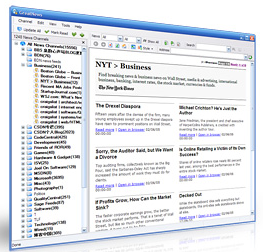 where the left pane shows the list of feeds & feed groups, the right top portion has the list of headlines for the selected feed/group and the right bottom pane shows the content from the selected headline.
GreatNews has button in this pane which makes collapsing and adding these panes back are so quick. You can switch from reading the headlines in the 3-pane or 2-pane mode to reading a long post or a series of posts from a feed in full screen so fast, you’ll be addicted to it. - Individual feed settings: You can set how often you want your feed to be refreshed automatically or you can set to feed to update only manually (I have a hundred feeds that I don’t read everyday but only once a week). You can set different styles to different feed groups and choose the frequency in which you want it cleaned up. You can set these features on a feed group but can override any of this for an individual feed by setting its own.
- Styles: Most desktop readers allows some level of customization to the look and feel of the feed content.
GreatNews comes with a few nice styles plus there are some user created styles that you can add to it or if you are CSS savvy, you can create your own to suit your taste. - Track comments: This is an excellent hidden feature in GreatNews or atleast I just found it and love it. If a blog offers a comment feed like BAYB does, you can track comments right under the post content from within your feed reader. No more jumping to your email to followup comments where you may not even know what the comments are about after a week.
- Quick reference: You can control the cleanup schedule for an individual feed or a feed group. You could use your desktop RSS reader as a offline copy of a part of a blog by setting it to never cleanup. I have my ShanKri-la feed set to never cleanup which means I have instant access to my past posts since the time I added it to my feed reader. You can get creative with other blogs that you use frequently for tips or for the Weblog Tools Collection blog to have a quick reference to plugins/themes, etc.
If you are a RSS feed reader, then you are already committed to saving time and improving productivity by reading more content than you would be able to, by visiting every site. Why not take it to the next level of productivity, by using a desktop feed reader?
I haven’t ditched my web based feed reader. I still use Google Reader or Netvibes for casual surfing once in a while. But, GreatNews has definitely helped me with blogging efficiently as a lot of us are doing this besides our day jobs and anything that saves me time, I am all for it.
A few desktop readers to try: GreatNews, Omea Reader, FeedReader, etc. I use GreatNews for its excellent features and its portable so I use it from my USB drive.
Do you think a desktop RSS reader could increase your productivity as a blogger? If not, I’d love to hear why.
I write about more technology related topics at ShanKri-la – where technology meets daily life!. My goal is to make your life on the Internet a little bit easier, a little bit manageable and a little bit more enjoyable.