
WordPress 2.3 is out, will you upgrade?
With the new version of WordPress being released this past Monday, this week might be your first chance to upgrade. Here are a few tips to help you with the process. First off, if you are one of those bloggers who procrastinates doing site maintenance, this is a very easy process and will take between 5-30 minutes depending on FTP speed. Second, don’t forget to backup your wp-content folder, because if you lose that, you lose all your uploaded pictures, themes, plug-ins, basically the flare of your blog!
WordPress has a codex document that spells out how to upgrade if you do not know how. I highly recommend backing up your database as they suggest, also why not install a automated backup plugin at the same time to save yourself in case your site ever crashes?
The most obvious reason to upgrade WordPress is that your admin interface will get a couple nifty new tools such as Google incoming links, and the ability to sort posts more efficiently. Scheduling posts is much easier in 2.3 and any blogger who hasn’t used them should be sure to in 2.3. It is really amazing at the rate you can manage your posts with 2.3! You also have the ability to tag, which is a key element of Web 2.0! Oh, and Matt don’t forget to upgrade Blog About Your Blog as I see while writing this post that you are still using 2.2. I will try to help you if you have any questions about upgrading, just drop and give me a comment.
This post was written by Ryan of Krispy Blogs.
Paying Our Blog About Your Blog Authors
To offer incentive for our BAYB authors, I decided I would give away cash to our active authors. The idea is simple, the more popular the articles you write, the more “active” you are. A lot of the articles by our authors this month were popular on stumbleupon.
Mark was easily the leading author this week contributing 6 articles, his most popular being Two Free Font Utilities You Should Check Out. He will be receiving 20$ from me into his paypal.
Our second author Cristian, who wrote One Opportunity You Shouldn’t Miss came in “second place”. His article generated over 600 hits mostly from stumbleupon. It was his first article he has written for us. He will receive 10$.
Our third author Tammy Duplessie wrote an interesting article on Blogger’s Next Blog. She just edged out the author contributors for third place and 5$ cash on paypal. It was also her first article for us.
If you are an author who won $$ please contact me with your paypal information.
Next month we will be doing the same thing, so you can win money too. Look’s like Ed is in the lead so far this month with his article about Jiglu.
Jiglu – Tagging heaven
In this Web 2.0 world we live in, tagging is one of the mainstays of networking your material. If you start as you mean to go on and get into the habit of listing relevant keywords or tags at the end of every post, you should be able to maximise the usefulness of the humble tag without too much discomfort.
However, tagging is still not totally mainstream, and some of us who want to move on from Web 1.1 and adopt the tag fad are faced with severe updating hassles. For instance, a while back there was a major update to my blogging software and tagging became a standard feature. Better late than never, I thought, but when faced with the reality of tagging 1200 posts, the new feature looked more like a new penance than a thing of beauty.
 For once my procrastination was rewarded and I recently came across an automatic tagging service. Thank you London for Jiglu. If you look in the left sidebar of my oh so humorous web site you will see a Jiglu box with auto-generated tags. Click on them and see what happens. Cool hey. All the tagging work done for me, and even divided into topics, people and events.
If you register for free, paste their code into your template and wait a couple of days, the Jiglu robots will do the rest. What do you think?
Right, now where do I put tags in this antiquated WordPress software.
Comment Friday Link Love
The end of a pretty hectic week, only to start up again with the first of the month upon us. For Comment Friday I asked for opinions on our layout and if displaying recent posts and recent comments on the sidebar matters. I will be doing a follow up post about it when I get the chance, pretty interesting responses.
One of the things mentioned by RoDaniel, Homemom and Brooke was that our sidebar runs past the page. It has to do with the CSS I think? I haven’t been able to figure out the problem, if anyone knows how, please contact me we’ve had this problem since we rolled out this design months ago.
Thanks to everyone who wished Matthew a happy birthday. He is the heir to the BlogaboutyourBlog.com empire so start sucking up to him now. He is still accepting presents by the way. Thanks to Susan Mellott about the kind words regarding me and BAYB.
Since it’s almost Monday I will give our current blog of the week another week on the sidebar. I hope the link love above was enough to hold some of you over until next friday.
Tomorrow we will be announcing our months income as well as the Blog about your Blog authors who made money.
Sell Your Cell for Cash
I’ve had a cell phone since junior high and I’m 21 now. Within that period plenty of my cell phones became old, outdated, and obsolete. Using Cell For Cash you can easily sell your outdated phones.I spent some time looking at cellforcash.com checking how much they would actually pay me for my old phones. Since I’ve had quite a few Nokia cell phones I started there first. They don’t offer a lot of money for them, but it’s better than nothing (5-15$ range for ones I’ve owned). If it’s older than 2 years old you may not be able to sell it, but you can recycle your cell phone for free.
The process to sell your cell phone is simple. Select the cell phone you wish to sell, submit a form, and a free postage paid box will be sent to you. Once you send in the phone you can receive the $.
Win a Wii… Or Not
 I chose to review this website, not just for the unique idea of it, but I also thought it would be fun to promote their Wii contest. However I was pretty disappointed to find out there wasn’t a way to register. If you are trying to win a wii there is no entry form on that page. You can see a winners list, so they’ve given away prizes before. Good luck trying to enter…
Comment Friday for September 28th
 Friday already, I think I will take the time each friday to mention whats going on with me personally. I’ve been really overwhelmed and stressed, mostly about money. I should be getting into that later next week. My son is turning two tomorrow (Saturday) so the stress runs through that as well. With so much to do, and blogging my main source of income I haven’t been able to devote enough time to it. Now onto Comment Friday!
If this is your first comment friday, the idea is pretty simple. Leave us a comment about anything you want. I will select one lucky commenter that really stands out, and I will be giving out a free link to that person. In addition to that that, I will be giving them a free blogroll spot.
I have been really experimenting with ad placement on this site and It’s All Free Online. Along with putting up new ads, I’ve also removed the “Recent Comments” and “Recent Posts”. Have you noticed? If so what do you think? If you don’t regularly visit the blog, do those two things on the sidebar really matter to you?
I will be choosing a winner for the contest soon, I have all the entries together (40 entries!), I just have to film myself drawing the winner. Don’t forget we still have a free promo code for the newest thing in website promotion, Adspheres.
Know More About Your Airline Seat With SeatGuru
Written by Mark MeAndMyDrum | Fave MAMD | Subscribe to MAMD
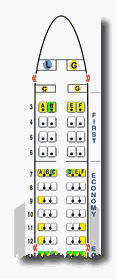 SeatGuru is a repository of 275 seatmaps for planes. Big deal, huh? Well, it is if you’re a traveler and want to know where your seat is, is it close (or too close?) to a lavatory, near the bulkhead or wing or exit?
Traveling can be a hassle just by itself. Why not make your flight a little more comfortable/enjoyable by finding out what others have said about where you’re placing your backside? What’s more is that you can also help others by leaving comments about your experiences.
What can I find out?
More than you’ll probably need to know, but nothing wrong with being prepared:
- Is there a changing table onboard for infants?
- Are their video monitors? If so, where are they located?
- Are there any power outlets I can use for my laptop or charge my cell phone?
- Are snacks offered? When?
- Does one seat have more legroom than another one?
What types of planes are included in this baby?
Tons. First, you select your airline in the alpha listing. When you do, you’re greeted with a list of plane models currently on file. Select one of those and you’re shown a layout of the plane’s seating, complete with color codes, some of which present information when you roll over them.
I mentioned comments are gathered from fellow travelers, but you can also expect to find information from insiders like pilots and flight attendants.
WordPress and Category RSS Feeds
So, you like a certain site, but you don’t like all the posts in all of the categories that the writer writes in, some of the topics just don’t interest you or you are only interested in one of the topics.
Well, did you know that for WordPress sites there is an RSS solution that will save you scanning through all those feeds your not interested in?? It is simple, use the category feed instead of the main site feed.
You can subscribe to the category feed, by simply go to the category page that you wish to subscribe too.
For an example the “blogging” category here at Blog About Your Blog is at this URL: https://blogaboutyourblog.com/category/blogging/
You will know it is a category page because the word category is in the URL itself. This is a default URL from WordPress and I don’t think there are very many bloggers that change this default as it is a good one. You can find the category pages on a lot of sidebars and on most sites somewhere next to where you click to leave comments.
You then just simply at the word “feed” with a backslash(/) to that category page, so the example blogging category feed is located at: https://blogaboutyourblog.com/category/blogging/feed/
You go to that page and it will allow you to subscribe to only the feeds of that category and you will no longer need to sort your RSS feeder of the stuff you aren’t interested in.
I am Jennifer from The Life of a School Bus Driver, hoping that you will check out my Blogger of the Day and even subscribe to the Feed.