
Win A Free Blog By Garry Conn
Written by Mark of MeAndMyDrum | Fave MAMD | Subscribe to MAMD
If you’re a newbie blogger looking for tips on how to get started or someone who has been blogging for a while, but needs a little boost, there’s a contest you should know about that will help you both.
Garry Conn has more blogs than you can shake a stick at. It’s no hobby either because this is what he does for a living. He makes his money mostly from his successful use of Google AdSense. What’s cool is that he can help you do the same if you win.
What do I win in this Conn-test?
Something you don’t see very often, that’s for sure. Here’s a summary of the goods:
- 1 year free hosting for a blog
- Help finding a profitable niche for your blog
- Help finding the perfect domain name
- Install WordPress with all the bells and whistles working behind the scenes that can help your blog stand out
Garry recently launched a new blog called How Do I Make Money Online? On Day One it received well over 1,300 visitors. Not too shabby right out of the gate.
If you were to put a price tag on all this, you’d have $2,000 worth of services. If you want a chance to grab that, I encourage you to visit his post for more details.
The BlogRush is Over
I held off on the inital ‘rush’ for this website. Instead of posting another generic post announcing that BlogRush is sweeping the blogosphere I held off on that, instead put the widget in on the sidebar.
The ‘rush’ for MyBlogLog has really died down since they haven’t offered anything new in a while, so the BlogRush widget took it’s place.
The Results
As bloggers like John Chow and ProBlogger have reported, their click-through rate has been low, so how about bloggers like me who don’t have 100’s of referrals?
It’s even worse.
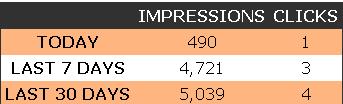
Credits we’ve earned over “the last 7 days” is 4,353. If traffic remained the same thats over 10,000 impressions per month. At a result of only 3 clicks and no revenue generated, that space is essentially wasted.
Abuse of the System
BlogRush has stated that click-through rates are low due to ‘users cheating the system’. Unless the format is drastically changed I can’t imagine how they can weed out who’s cheating and who’s not.
It has also been mentioned that some users are placing the widget in places that doesn’t get many clickthroughs anyways. Or that the blog itself doesn’t get many clickthroughs. This will continue to be a problem. Unless there is some moderation, which would be impossible, clickthroughs will remain low due to this problem.
If you were someone who actually experienced a “rush of traffic” consider yourself lucky.
A Cool And Easy Way To Show Off Blogs
There are a few posts I’ve written here where I’ve mentioned the phenomenal bookmarking service call Diigo. It’s something I use all the time. And when I do, I’m making a copy to two other bookmarking sites at the same time just for safe keeping.
The folks at Diigo have pushed the envelope a little farther with something they’ve recently announced call WebSlides. The reasons for using such a service are numerous, but the one I see being used the most is for bloggers to highlight other sites.
Another use is to create a presentation about your own blog for visitors to get to know about your place. It might be a nice addition to your sidebar or About page.
A presentation is very simple to make. While in your Diigo account, you select the sites you want to include and save them to a list. You can then add an audio file for background music or narration if you like.
Readers can adjust the speed at which they move from site to site. They can pause it or even click on the sites provided in a list at their own pace — all without having to create a Diigo account of their own.
I’ve explained more in my own presentation, so click the button below and take it for a spin. (Btw, yes, that’s me narrating. 🙂 )

The sites I’ve included in this presentation are:
Brown Thoughts
Ordinary Folk
Pink Internet Marketing
ShanKri-la
Revellian.com
Kyle’s Cove
Christy’s Coffee Break
The Sapheyerblu Review
Blog About Your Blog
Garry Conn dot Com
BlogsWeLuv
10 Firefox Add-ons to Supercharge your Blogging
Blogging is fun but sometimes it can be hard work. If you use Firefox for browsing, you will be amazed at how your tool for browsing can be transformed into a tool that supercharges your blogging experience!
Here are some Firefox extensions (in no particular order) that can give you that extra oomph in blogging. I have included a few tips on how you can leverage these extensions in various aspects of blogging so that this post doesn’t end up being another list of Firefox extensions.
- Clippings – If you find yourself typing information over and over again in web page forms or forums or in your
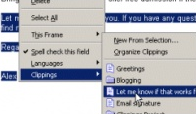 email, you will absolutely love this extension. Just type once and save it to access it in 2 clicks from your context menu or status bar. Clippings Manager offers folders to organize your Clippings and an option to export and import your clippings between computers.
Tip: I use Clippings to store my frequently used blog post urls that I refer to or link to in comments. The bottom meta text in this post is from my Clippings. - Copy Plain Text – When you are trying to copy text to quote someone or provide an excerpt from another blog post, it can be annoying to paste the text with all the original formatting. This simple extension adds an option to your right click menu to copy plain text.
- FireFTP – An excellent ftp client that will open right in your browser. Upload/download pictures or files to your blog host from within your browser. Features like directory comparison, directory sync, SSL encryption, search and filtering makes this a valuable tool for your blogging arsenal.
- InformEnter – Clippings is great for big blurbs of repetitive text that would like to copy. But, aren’t you tired of typing your information in web forms over and over again? InformEnter adds a small clickable icon next to each
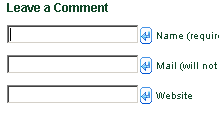 field and you can click on it to enter the information you need. You can toggle it on and off with a single click on an icon in the status bar.
Tip: Create different profiles and switch easily. I have one for commenting in blogs – with the usual Name, email & web address. I have another for registering for user accounts in various web sites. I have one for shopping with my home address. You can also store your frequently used blog post URLs with your comment profile. - Screengrab – I love adding pictures/screenshots to my blog posts. A picture is worth thousand words indeed. Gone are the days when you would have to printscreen the whole page and then use Microsoft Paint to crop the image you want. Use ScreenGrab to snipe just a portion of the page you are looking at save it to your computer or clipboard. You have option to grab just your mouse selection or complete page or just the visible part. You can set the option beforehand to save it to either jpg or png.
Tip: If you’d like to resize, edit, crop some more or add some effects to the picture right after taking it, try a portable freeware called FastStone Capture. It is fast and offers more screen capture options like freehand selection and comes with a really capable image editor. The image you capture automaticall opens in the fast editor and you save it as it is or resize/work on it before saving it. With FastStone, you are not limited to screenshots of stuff in your browser. - ScribeFire – Previously named Performancing, it is a blog editor for Firefox. It is a love and hate relationship for a lot of bloggers with this extension. It is very capable and has a lot of options and would be great for anyone who would like to write from within the browser. Also, it could be very handy if you are trying to write on your laptop with no internet connection. You could just Publish it to your blog from the editor as soon as you have an internet connection.
- SearchStatus – This extension is mostly known and used for SEO. You don’t have to be an SEO expert to use this. In its very basic form, while surfing other blogs quickly see their Google Pagerank, Alexa rank and Compete rank with this extension. When you are looking at blogs with dofollow enabled for comments, this can be of great assistance to help determine where to concentrate your commenting to gain backlinks.

It also features other SEO features such as keyword density analyzer, keyword/nofollow highlighting, backward/related links and more.
Tip: By commenting in ShanKri-la (after 2 comments), you start getting free PR3 backlinks! A lot of blogs have top commentator plugin enabled and it could be easy way to getting a prominent link for free. - ScrapBook – I could write a whole post about ScrapBook. Its Google Notebook in steroids. Better yet, it resides in your browser and requires no signing in!
Instead of reiterating all its features, I have Screengrab-ed the list of features for your reference. It’s so feature-rich that you would want to cry when you start using it. The options are mind blowing, so take your time setting it up as you go and as you get familiar with all its capabilities. - StumbleUpon – Facing blogger’s block? Some might suggest taking a break. But, if you are trying to make money blogging, taking a break might not be an option. Get a StumbleUpon account and start stumbling your favorite topics. Inspiration comes standard with this extension.
Note: Even though it is available as an add-on, you are actually installing a toolbar. - OneClick Installer for WordPress – This a WordPress Plugin + Firefox extension combo. Once you have this installed in your WordPress blog, installing plugins and themes are just a click away in your right click menu in Firefox. A real time saver. No more FTP for installing themes & plugins.
I hope this list brings atleast a couple of new ones to your attention. If you find atleast one of these extensions that is going to supercharge your blogging, then my time spent writing this post is well worth it.
Let me know if it did and please share your favorite Firefox extensions that help you blog efficiently.
To read more technology related topics, visit ShanKri-la – where technology meets daily life!. My goal is to make your life on the Internet a little bit easier, a little bit manageable and a little bit more enjoyable.
If you’d like, click here to subscribe to ShanKri-la
Promoting Your Website on Adspheres
Our friend TK has started a new project and has offered a nice promotion to us for his official launch. Adspheres.com is a new way to promote your website or blog. The first twenty of our readers who use the promo code 887f2866 when registering, gets an adsphere for free!
What is Adspheres?
Adspheres is an old idea, redone. By creating a sphere you can promote your site. You can create as many spheres as you want, each sphere links to your website. Here is what our sphere looks like.
Promoting Your Sphere
The spheres are ranked according to how much money you have on your sphere. Our sphere is the #1 sphere with 11$ on it. To put more money on your sphere you can do several things
- Log-in Everyday
- Invite Friends
- Refer Visitors
- Pay Money
For every 20 logins you can earn one dollar. By inviting people via email you can earn a dollar. For every 20 visitors who use your referral code you can earn a dollar. Of course, you can earn a dollar by paying a dollar.
Sell your Sphere
You can build up your sphere influence by the ways mentioned above, and if you want to, you can sell it. I currently have our sphere up for sale for 5$. If I find a buyer I just plan on rebuilding another sphere for us. If you are just getting on the website now, and want a head start go ahead and buy mine!
Your Thoughts
Adspheres is, as mentioned, in it’s early stages and feedback is important. If you decide to register and use the promo code, 887f2866, please leave your thoughts.
Comment Friday Winner: Laura Williams
We didn’t get as many comments this last friday, but it may of had to do with the topic. It’s been hard posting lately, I sort of took the weekend off. Emma hasn’t been feeling to great, I just had to pay a huge bill, Matthew’s 2nd birthday is next Saturday, so everyone is a bit stressed. I hope everything settles down soon, I’ll be working online most of the day. Feel free to drop me a contact if you’d like to get in touch.
Now to get on to the Comment Friday winner. Since it’s already monday this person will get an extra week on the sidebar. This week the choice was easy, many of the commentors have been selected before. Then I saw Laura post a huge comment regarding contests. She recently posted a huge list of contests, which our contest was included in.
Congrats to Laura and thanks everyone for leaving a comment, anyone have a suggested topic for next friday?
Rebuilding with Rebuild.Org
Rebuild.Org is a finance and credit site, with a nice and refreshing layout.
The Summary
To get the gist of the website we can just look at the homepage.
Rebuild can connect you with lenders who can understand and forgive your current credit issues. Whether you are searching for an auto, personal, payday loan, seeking debt consolidation, mortgage loans, home refinance or a home equity loan, we can introduce you to a lender that matches your requirements.
Educate
What I like about this site in particular is that instead of giving you cheap info and trying to sell you to a plan or company, you can find out genuine information. Particularly things like when a refinance loan is the best option. Basically you would want to refinance if you started with a high interest rate, and now you can get a lower one.
Loans
Getting a cheap personal loan can really bail you out of any tough unforeseen money problem. When considering a personal loan there are things to be considered such as bad credit and what the loan is for. Another option for that would be a cash advance loan. It’s basically just taking your paycheck early, but it can also be trouble. I never believe those easy payday loan commercials anyways!
For great information on loans Rebuild.Org offers great information and resources to educate you on different topics.
Blogger/Blogspot Next Blog Warning
Blogger.com is a free blog hosting site that has many features, but there is one feature that needs work. There is an option on the top of blogger/blogspot blogs that allows you to view random blogs. This “Next Blog” feature can be a useful way to seek out new blogs, but beware of using it. Although Blogger has a policy that does not allow pornographic material to be displayed on their blogs, they do not monitor the blogs. Many bloggers have been surprised when they use this “Next Blog” feature and are directed to a blog that is pornographic or has an inappropriate content. Although Blogger does have a Terms of Service Policy that states you must be at least 13 years old to have a blog and that pornographic or inappropriate material must not be displayed, it seems that these are just words used to protect themselves. Part of Blogger Terms of Service Policy states,
“By their very nature, Blogger.com and Blogspot.com can carry offensive material, or in some cases, postings that have been mislabeled or are otherwise deceptive. We expect that you use caution and common sense when using Blogger.com and Blogspot.com.”
Precautions from Blogger
When bloggers come across these types of blogs they have an option to “Flag” and report these blogs as inappropriate. The blog is then unable to be viewed until Blogger checks out the blog. Instead of relying on bloggers to do this they should have a screening process that weeds out these inappropriate blogs. If Blogger does wish to allow these blogs to use their service then they should not include them in the “Next Blog” feature or put a warning before the blog appears that it contains inappropriate material for some viewers.
Monitors for the Monitors
Although Blogger is a free hosting site, it should monitor the blogs they host and can not expect that every inappropriate blog out there will be flagged by someone else. This may be a case of you get what you pay for and since Blogger is free they may not be willing to do this. The next time you use the “Next Blog” option be forewarned that the site you are going to maybe inappropriate for some viewers including yourself.