
Comment Friday Winner: AdTracker
This week I asked which tools for blogging do you use most and there are a lot we’ve already covered. Reader, stumbleupon and mybloglog were very popular answers. However, there wasn’t a digg mention at all.
For our blog of the week, I chose Adtracker. The most important tool that they use for blogging his their “old noggin'”. I guess that would be the most important blogging tool. They also have an interesting blog with the topic of adsense, however they offer other blogging articles, as well as blog reviews. Maybe from choosing them as blog of the week we can receive a review as well?
We appreciate everyone coming by on fridays and leaving us a comment, you guys are great. If you missed it there is aways next friday!
Long Term Care
Every think of the long term aspect of your life? Long term care…
Well first we should find out exactly What is Long Term Care Insurance?
“Long term care insurance is the type of insurance that will pay for care a person receives when they need help either at home or in a facility with their activities of daily living due to an accident such as a fall, illness such as Alzheimer’s, or just plain old age.”
Now knowing exactly what it is, this site provides some interesting facts. Such as, 49% of people who are 65+ will need long term care assistance before they pass away. That really gets you thinking.
The Blog
Just as many webmasters are learning it is beneficial to have a blog. The blog provides long term care insurances news and information. I’d like to see the blog portion of this website be a little bit different. The background and sidebars are all the same as the homepage.
Have you started planning for your ‘future’?
Comment Friday for August 31st
 If this is your first comment friday, the idea is pretty simple. Leave us a comment about anything you want. I will select one lucky commentor that really stands out, and I will give a free link to them. Not only that, but they will get a one week free blogroll spot for a week.
This week I’d like to know about which tools you use for your blogging. Whether its a feedreader or mybloglog, which services and websites do you use MOST? I don’t know where I’d be without my google reader, and really any type of blog forum, thats where I find I use a lot of my time, how about you?
40 Ways to Promote your Blog
I recently received a nice contact from Patrick Herber who runs the community blog Top Secret Blogger. He brought his article to my attention, and I asked him if I could mention it and republish it.
His article, 40 Ways to Promote your Blog, lists tons of Press Release sites, Directories, and Social Networks. I have talked about several like craigslist, blog catalog, and others. I also plan to take this list and make it bigger!
The list is a great starting point for essential tools for your blog.
John Chow just wrote If You Build It They Won’t Come. Just because you create a blog with good content doesn’t mean you will get loads of visitors. Blog marketing is extremely important. The better you can market yourself and your blog, the better blog you can have.
How do you market your blog?
Germ of an idea for a How To… blog
A while ago, Matt gave me an idea to broaden my blogging horizons – he suggested I start another blog! I set to thinking about a topic I would enjoy writing about day in, day out, in a niche that I know well to the point of being an authority. After dismissing the idea of a How To Make Money Blog, I went back to my roots. Would anyone undertaking a home decorating project be interested in a How To… blog written by a master painter with a modicum of humor? Who knows, but I aim to find out.
Rather than launch myself into it feet first, I have decided to test the water and post a sample article. I think it could do with some images, but for now, what do you think to the following. Worth pursuing, or re-think?
10 tips for using a paint roller without getting more paint on you than on the wall.
Before I launch into the list of tips, rest assured you are reading the words of a real painter who actually went to college for 4 years to learn the basics of the trade. Unlike most painters who learn at the School of Experience, I was taught the principles as well as the mechanics of painting. I hope that subtlety shines through in the following list.
1 – Wear a hat, unless you want to end up looking like Richard Gere.
2 – Wear coveralls, unless you have more money than sense. If you are so loaded you can afford to ruin your best clothes with latex paint, why not employ a professional painter and save yourself a trip to the clothes store.
3 – Cover the floor and furniture with plastic sheets. As in tip 2, if you have so much cash that you don’t mind wrecking expensive couches and rugs with $10 paint spots, use the money to employ a professional painter.
4 – Place your roller tray on a sheet of cardboard. You will be able to work faster because you won’t be preoccupied with paint dripping off the tray onto the plastic sheeting (or carpet, if you are lazy). You can also keep the tin of paint right next to your roller tray, which means you can drag the whole lot around very easily and don’t waste time walking back and forth keeping the tray filled with paint.
5 – Always use a roller pole. Trust me, it is easier, faster and gives a better finish. Extendable poles that start life at about 3 foot and extend to 10 are the most useful. Obviously, don’t be afraid to take the roller off a pole if you are getting wedged in a tight spot!
6 – Use the appropriate roller sleeve for the surface and the paint you are using. The smoother the surface or the shinier the paint, the shorter the nap or pile you need to use. Rather than give an exhaustive list, the simplest way to choose the correct sleeve is ask the guy in the paint store, or if you are in Home Depot, read the labels.
7 – Trim the ends of a new roller sleeve with a pair of scissors so you get rid of the long nap AND WASH IT UNDER A TAP TO GET RID OF FLUFF. This tip from SCH is one I never came across before in 18 years of working, but it makes sense. (Basically, under use, a sleeve wears out at the ends first, and it isn’t unusual to see pros using what you might consider to be a half bald roller sleeve. They are happy painters, though, because the knackered looking rollers don’t leave lines like a new fluffy one.)
8 – Pour the paint out the back of the can – ie away from the label that tells you the color and type of paint. Also, wipe the excess paint off the rim using your brush. There is nothing worse than replacing the lid, standing on it to wedge it tight, and then walking off with paint on the sole of your shoe! Do not ignore this tip, even if you know you will definitely use all the paint from the tin in one session.
9 – When filling the tray, pour from a few inches high, not a few feet. Splatterville is not a good place to work. Also, very important, don’t let the paint flood the well of the tray and spill onto the section where you charge the roller.
10 – Take a breather. Now you have the room, you, a roller sleeve and a roller tray prepared for painting. But don’t even think about rolling anything until you have a) read the next round of tips on rolling, and b) painted around all the edges of your first wall with a paint brush!
You heard it first. Opinions welcome.
Free Tools to Tweak Your Blog
Last week, we looked at how to check the health of your blogs with some free tools. Now, that you know where you rank and started implementing changes that will increase your Google PR, Alexa Ranking, etc., it’s time to spruce up the looks of your blog.
Free Development Kit
If tinkering with HTML, PHP or CSS is your cup of tea, it may be worth your while to check out this excellent free development kit, HTML-Kit. Even though the name suggests it is a HTML editor, it is much more than that. It could be an excellent tool kit for a web developer or someone learning web development.
Some of the features of HTML-Kit: 
- Full featured drag & drop enabled editor
- Supports various programming and scripting languages like PHP, JavaScript, CSS, XSL, Java, Python, etc.
- Over 400+ free plugins available to enhance various features.
- Dockable and floating toolbars
- Keyword help and TagsReminder provide just-in-time help for applicable tags.
- Configure FTP servers and access remote files in local workspace.
Chami.com provides not just the HTML-Kit but also a variety of online tools for adding a nice touch to your website or blog.
For Linux users: Quanta Plus is an excellent option.
FavIcon from Pics
Favicon is that little icon that appears in the address bar of your browser and in your tabs. You can generate a favicon for your blog just by loading a picture here. You can also choose to animate your favicon with scrolling text although personally I think that it might be annoying to some. For the design challenged like me, you could use the Image Embellisher tool to add some effects to your image before creating the favicon.
CSS Poster
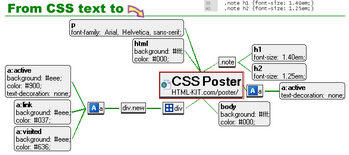
If you like to edit your CSS style sheets of your themes, you are probably driving yourself up the wall trying to read through the bland file with miles and miles of selectors.
You can now visualize your CSS file with this CSS Poster tool that creates a visual representation of your css file. The css file you upload has to be less 300K in size. You choose the sizes of your output file from small to extra large and it generates a PNG file.
Fresh Badge Generator
I came across this cool badge generator at MeandMyDrum. It has plenty of options and tips to generate your own cool web 2.0 badge than what I have seen in other online generators. Go ahead and create one for your blog.
With availability of so many free WordPress themes, it is still possible to find your theme on another blog as well. But, if you learn to tweak little things you could quickly give your blog an unique look!
I would love to hear what tools do you use to tweak your blog.
To read more technology related topics, visit ShanKri-la – where technology meets daily life!. My goal is to make your life on the Internet a little bit easier, a little bit manageable and a little bit more enjoyable.
Sell Your Own Sponsored Reviews
Bloggers and advertisers alike can benefit in cutting out the middlemen like Payperpost and ReviewMe. It means more money for the blogger and less money for the advertiser.
How I Made 100$ in a Day
Sponsored reviews for BAYB has really slowed down lately and there is no reason for that. Our blog is thriving and growing everyday. Since we aren’t lacking on our end, it must be who’s selling the blog posts for us.
So after browsing the digital point forum like I usually do, I noticed an interesting thread. The title read something like “20$ for a Blog Post”. What was even more interesting was the amount of response it had. Why can’t I do that? Previously my main focus was on sidebar link sales…
Learning from this person I also listed my own thread “Blogposts 25$” That’s fair right? Through Reviewme our price could run from 60-100$. In the thread I listed approximate traffic levels (300 unique visitors+ per day) and basically what kind of review they could expect.
Not only did I get interest and sales for posts on BAYB, but I even sold a review for Fantasy Football N Stuff.
Don’t Overprice
One “fatal” mistake you can make when trying to sell sponsored posts, is pricing yourself out. Just because ReviewMe and Sponsored Reviews “value” your blog at 100$ doesn’t mean you can sell them at that price. Remember you only get about half of that anyways.
I often see many PR0 blogs with low traffic charging 50-100$ a review. What value are you going to give a potential advertiser? No “google juice”, no traffic. At 50-100$ that’s an expensive backlink.
Digital Point may not be the best place if you are a newer blog. Most are either looking for traffic, or some page rank blogs. However there are other possible forums that you can advertiser your blog on. If you don’t know where to start, sell low then gradually increase your price
Web Hosting Geeks

Webhosting Geeks isn’t another cheap webhosting site. They can however help you find the best website hosting. They give lists of the top webhosting sites, the best hosts of 2007. These include such webhosting sites as BlueHost, Yahoo and Hostmonster.
The rankings are done by a voting and review system. The best host is BlueHost, which is also given the “editors choice”. It was also voted the Best Blog Host as well. You can find webhosting by what you are looking for, whether its price, forum, or blog hosting.
Review your Webhost
A great feature they offer is the ability to rate and review your webhost. When I was reading the webhosting reviews I was disappointed at first. I checked Hostmonster and it gave maybe 5 reviews. Not that many I thought, until I saw there was a total of 23. That’s what I like to see!
However some of the other lesser known hosting sites only have several reviews, AN Hosting Inc only has one review. As they grow I hope the geeks can get reviews for all of the webhosts listed.
Free Domains
This wouldn’t be a very good hosting review without something free! You can also search hosting by which give out free domain names. There are currently 16 webhosting sites listed that give out a free domain name, some give out several. Hostmonster gave us Blogaboutyourblog.com for free.
If your thinking about hosting for the first time, or possibly switching hosts, check out the Web Hosting Geeks first!