
Clean Up Your Blog
In our recent Comment Friday, I asked “Does the design of the blog matter?” 35 yes’s later, it’s time to clean up your blog!
Limit Your Widgets
If you are running 10 different widgets, it’s time to narrow it down. Make a choice between mybloglog and blog catalog, they are essentially the same widget anyway. If a particular widget isn’t giving you any results, take it off. It will be easier on the eyes.
 Remember you only need one button for your RSS Feed. By having one, potential subscribers can “pick” what they want to subscribe to your blog with. You don’t need to list 10 different buttons for all possible readers.
3 Columns Can Get Messy
A 3 column blog can work, but you have to make it work. Having excess amount of widgets and banners can easily make your blog look sloppy and unorganized. If your blog isn’t easy to navigate, then it can easily get overlooked.
Related Advertising
Slapping various banners on your sidebar and labelling it “advertising” isn’t going to work. One, people are going to be less likely to click an advertisement, once they know what it is. Second, it looks bad.
The key to advertising is doing it without looking like it is an ad. By having clean, related advertising, it will look like it’s another part of your blog, rather than a huge advertisement.
If you need personal help on how you can make your blog look more “professional” free free to contact me and I can give you some pointers.
And The Winner Is…
They are the winner of the laptop briefcase from Eco-Handbags.
I want to thank everyone for participating and a big thanks to our sponsor for the great prize.

Website Design
Our last comment friday had an overwhelming response at how important the design of a blog is. It can take a while to learn how to design your own website. That’s where Dev3 – Web Design Services can help.
Website Design and Developement
Whether you are looking for a new website design, or a boost on your SEO, Dev3 can provide service for you. To see what kind of work they do, you can look at their portfolio. Even on their homepage is a list of their latest projects that they are working on. There is about two dozen websites to look at. It gives you a real good indication on what they can do for you and your website.
How Much is it Going to Cost?
I am more interested in their SEO services, so I have requested a free quote. This sends an email of what you want and they will give you a quote on what it will cost. They state that SEO starts at only 50$, that sounds good to me!
6 Spanking New WordPress Plugins You Haven’t Seen
WordPress fans might have heard about the WordPress Plugins competition held at WeblogToolsCollection blog. Out of the 30 entries (+6 that haven’t submitted their final code), I have chosen 7 WordPress Plugins that I think are really useful for enhancing WordPress functionality.
Let’s see what they are and why they made my list in no particular order.
- WordPress Automatic Upgrade
This plugin will be a welcome relief for a lot of bloggers who are jittery about upgrading their WordPress installations. Even for the seasoned bloggers, the steps offered by this plugin is nice so you don’t have to worry about forgetting to do a little thing in between an upgrade.
Read through the linked page to understand how it works before you start upgrading with this plugin. A backup before an upgrade is still highly recommended. A clear winner for making WordPress upgrades blogger friendly. - OneClick Install
A second plugin that is going to make self hosted WordPress installations more popular among bloggers. With this plugin, you just point to a URL or a downloaded zip file of a theme or a plugin and it installs it in ONE click! How cool is that?
Plus, check out these neat features:- Forget the hassle of ftp-ing, unzipping theme & plugin files
- Comes with a Firefox extension to do this – forget going to the Dashboard
- Helps non-techie bloggers as well as people with Firewall restrictions
- Updates itself
- ContactNG
ContactNG is simply a contact form done right. A contact form is essential for any blog and there is no reason it should look shabby. Use skins of your choice with this customizable form, even generate your own buttons. It sports intelligent and unobtrusive anti-spam features. Comes with support for the language plugin, Polyglot. - MyDashboard
If you have used Netvibes or iGoogle like interface, you’ll love what this plugin does to the WordPress Admin interface. You get gadgets that you add/remove, drag and drop and rearrange, change skins and if it’s your cup of tea, add your own gadgets with the API. It comes with standard gadgets that mimic the standard information in the Admin Panel like LatestComments, LatestPosts, IncomingLinks, etc.
I am looking forward to seeing more community developed gadgets for MyDashboard with the API provided with it. - WP Plugins Tracker
Another usability plugin that helps plugin management. Anyone who has been running a WordPress blog will know the hassle of finding out if the plugin they have is up to date or not. This plugin lists in a nice visual list of current version and the latest version of all plugins (including inactive) installed in your blog. Only caveat is that the plugin has to be listed in wp-plugins-db.org repository. But, I found that 90% of my plugins were indeed listed. - Simple Tagging
If you like tags, you are probably using, the very able, Ultimate Tag Warrior plugin. Simple tagging addresses UTW’s shortcomings like poor performance, absence of auto-complete as you type, tag management, feeds for tags, etc. Check out the full list for an array of impressive features offered by this plugin.
Check out these plugins as well as the others in the list. I picked out the ones that will be most useful for a majority of bloggers and the rest are not inferior by any means.
Use the comment section to sound off your thoughts and if you like any and why you like them.
I write about more technology related topics at ShanKri-la – where technology meets daily life!. My goal is to make your life on the Internet a little bit easier, a little bit manageable and a little bit more enjoyable.
While amateur web bloggers can choose any cheap web hosting service, that may provide them with basic hosting facilities and some customized services like best image hosting depending upon the clients’ preference and budget. But, in case of corporate clientele, where not only broadband services but also a dependable backup is required; business hosting services are the option.
Two Easy Ways to Reduce Spam on Your Blog
We get dozens of spam messages everyday. I have found there are two great ways to reduce spam messages on your blog.
Plugins
Askimet is the default plugin to help you fight spam. However, I personally use Bad Behavior.
Bad Behavior has blocked 914 access attempts in the last 7 days.
One of the features that I like about Bad Behavior is that all new commenters will have their comments set in moderation before they are approved. After they get approved once, you don’t have to approve them again (unless they change their name).
Close your Comments
I never really thought about this until recently. Ironically one of our most spammed blog posts is Why Is It That People Send Spam Still?
With several spam comments a day on that particular post, I decided to close the comments. That way the post wouldn’t get anymore spam.
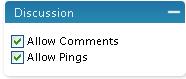 It’s really easy to do. First go to edit on the post you want to close the comments to. Right under the categories section there is a discussion tab. Uncheck the “Allow Comments” and save. That’s it!
This is also a great thing to use when finish a contest. That way people can no longer enter. I did this on several of our contest pages.
Comment Friday Winner: Life of a School Bus Driver
This week the topic was how important the design of a blog is. Personally, as long as I can read the site and navigate through it well then I don’t care much. However, I do agree that a unique design can turn on a visitor. Since the post I have been helping out Home Mom to clean up her theme. If you are gonna use loads of widgets and banners, try to narrow it down as much as possible. I will also be writing a post about this.
We got a great response on this question. Everyone pretty much agreed design is important, so if you are waiting to do a redesign of your blog to have it be more catchy, I would suggest pushing it to the front of your “to-do” list.
We’ve never had someone else get “votes” for being the blog of the week. When Brooke voted for Jennifer to be the blog of the week, I definitely couldn’t award it to anyone else. Jennifer blogs at Life of a School Bus Driver and several other blogs.
I am actually trying to sell some text links for her blog, if you are interested please contact me. I can run some great rates and offer some nice incentive.
Blogging for Alzheimers
Blogging has become a powerful way to raise money for diseases and charities. Whenever I see a blog promoting something that I can contribute to I will do so gladly. This type of thing isn’t a usual topic on our blog, but I thought it was important.
The Alzheimer’s Association Memory Walk is the nation’s largest event to raise awareness, support and funds for Alzheimers. The event is held annually in hundreds of communities across the country. Since 1989, the Memory Walk has raised more than 225 million dollars for the cause!
I checked the location nearest me and they are doing a San Diego Memory Walk on October 27th. It’s a 3 mile walk and that particular one has raised over 18,000 dollars already!
To increase that total, they need more Team Captains. A Team Captain puts together a team of fund raisers, sets a goal, and gets to work trying to earn donations. I personally don’t have time to be a team captain, but I fully intend on making a donation. If anyone who reads this and decides to become a team captain, I will make sure you get a donation from me. I could just see going broke!
Check out where there is going to be a memory walk near you!
Comment Friday for August 10th
 It’s another Comment Friday here at Blog about your Blog.
The “rules” are simple. Just leave us a comment about anything you want. I will select one commenter that really stands out to give a free link to, as well as a spot on our blogroll for the week.
Do you have what it takes to be the blog of the week?
This week I was wondering about blog design. Is the design of the blog really important to you? Or does it not matter because you are a feed reader anyways?
Don’t forget to give us a “plug” you don’t have to register to vote!
The winner of the Laptop Briefcase Giveaway will be announced this weekend. We reached our goal of 20 entries!