
The Difference Between MyBlogLog and Blog Catalog
When I posted 10 Quick Blogging Tips I included that joining blogging networks is important. MyBlogLog has been pretty consistent in sending 100-200 visitors per month to our blog.
Lynne asked
I am currently subscribed to blogcatalog not bloglog. Is one better than the other and why?
Besides the small differences, they are very much the same.
It Doesn’t Matter Which is “Better”
You should join both of them regardless how good they are. If driving traffic to your blog is your goal, join as many of these sites as you can. The more your blog is exposed to these networks, the more people can find your blog.
What You Put in, is What You Get
The amount of time you spend on this networks is key to how well they will perform. If you spend 6 hours a day building contacts, visiting blogs, leaving messages, adding things, doing backflips, and performing miracles, essentially the service will do well for you. If you spend 5 minutes a day looking at your stats, they won’t perform as well.
My Take on the Networks
MyBlogLog has easy upkeep, by simply putting a MyBlogLog widget in your sidebar you can display your recent readers. With little promotion you can also build a nice size community. Many members have their settings at when they view your blog 10 times, they join your community automatically.
Our MyBlogLog community is currently at 592 members, just shy of 600.
BlogCatalog is on more of a ranking system that I don’t quite understand. I think you get more points for linking back to them and installing their widget.
Blog Catalog has more features for discussion and interacting with other bloggers that aren’t in your community. I have yet to utilize this feature, some threads get hundreds of replies while many get unnoticed. It may be good use for any promotion you may be offering, a contest your running, or something interesting you are doing at your blog.
The Difference is…
what you make it. The more you invest into blogging networks, the more you can get out of them.
Top 5 Reasons to Get Your Own Domain Name
I recently was asked what are the advantages of owning your own website. There are more than 5, but these are the best ones.
Credibility
I’ve said it before. If you give someone the opportunity to chose between two identical sites, one that is mysite.com and mysite.blogspot.com, they will chose the one on the domain.
I couldn’t say it better than what Chrisblogging said about blogspot.
“It may be free, but if you are serious you need your own host…”
Reliability
Some of you may remember when The Bestest Blog of All-Time was suspended due to violating blogger TOS. He was apparently flagged and warned, and his blog was taken down for over a month. Imagine if any of the A-List bloggers lost a month. They’d lose thousands of dollars.
By hosting your own blog, you can backup your files and if anything happened you can just upload them again, with little downtime.
Customization
When you have your own self-hosted wordpress blog, there are tons of ways to customize it and make it your own. With hundreds of themes, and hundreds of plugins, you can really make the blog your own and essentially, unique.
How many unique blogs have you seen on blogger?
Add-ons
With one hosting plan your possibilities are endless. Feel like adding a forum to your domain? Do it. Want to make a directory page, go ahead.
Maybe you start a blog, and it’s not working out for you. You can then turn the domain into something else completely if thats what you want to do. Obviously owning your website comes with power.
Professional and Branding
This bases on reason number 1, but it’s a bit different. Do you think the top bloggers would have such a powerful and well known name if they were on blogspot? John Chow Dot Blogspot just isn’t the same.
Have I convinced you to get your own domain?
If you already have your own domain, why did you decide to get one?
10 Quick Blogging Tips
I hope to compile even more helpful lists for bloggers, so I am starting here. I put together 10 quick blogging tips, in no particular order.
Have Your Own Domain
Blogspot can only take you so far. There are successful blogs that stay on blogspot, however if you are looking at two identical sites. I would chose the one with the domain name.
GoDaddy.com $1.99 Domain Names
Update your Blog Daily
This may be important to you if you value stats. It’s not vital, but it’s good practice to update your blog regularly. By offering new content, your visitors will keep coming back.
Make your Feed Easy to Subscribe to
When I discover a new blog, the first thing I do is subscribe in the RSS feed. If the feed isn’t easily available, a less patient person just might skip over your blog completely. I read that many “webmasters” and bloggers do. Bloggers are busy, keep everything as easy as possible.
Make an About Section
The first place a new reader will look is to the about page of your blog. Unless they start reading your blog on your very first post, they need to get caught up. Make sure your about section is informative and descriptive. Tell them what your blog is about, without boring them to stop reading.
Comment on Other Blogs
The way I have started reading several blogs, and even found a few authors, was because they found me first. Then, they started commenting on our blog regularly. The more you see a person, the more inclined you are to visit their site. 90% of the people (ever) who has left a comment on comment friday, got a personal blog visit by me. This has turned into blogs I read and contribute to often. Get noticed!
Comment on Blogs with Do Follow and Top Comment Lists
but, DO NOT SPAM. That is key. By leaving genuine comments this not only gives you link love, but you are also contributing to their blog. I often contribute comments on blogs with do follow and top comment lists and it has definitely boosted our blog rankings.
Use Social Bookmarking Sites
You never know you may make the front page of digg, or get 1,000 stumbles from stumbleupon. Stumbleupon gives us a huge boost in traffic every month. If you like our posts, make sure to give them a stumble!
Join Blogging Networks
My favorite is still mybloglog. Our community generally sends us 100-200 visitors per month. We have built a great community with very little effort. However, I have noticed a small decline in mybloglog since it first was created. There is a lot of competition now, it can’t hurt to try them as well
Take Part in Blog Promotions
If someone is offering a free linkback for just mentioning their blog why not? Especially if they have a pagerank 5, and you are brand new and don’t have one yet.
Or perhaps a blog is trying out a blog carnival and are looking for posts that have to do with apples. You happen to write a post on apples. Go ahead and submit it. The more links to your article the better. Both ideas are a great way to build more links and traffic to your blog.
Be Friendly
Last, but not least. Be friendly. People will be more inclined to link to you if you are nice. If people feel like they know who you are, and would consider you their friend. Try posting a picture of yourself, and make sure to respond to the majority of comments. I am less likely to comment on a blog that never answers previous comments I’ve made.
There you have it, my 10 quick tips turned out to be lengthy, but I hope they help someone!
Read below for our readers blogging tips!

Certain advertising agencies focus their resources on blogging websites in order the catch the attention of general masses. For those who are blogging for fun, choosing an advertising option on their sites by understanding the ins and outs of search engine optimization can make blogging a means of earning and a fun activity at the same time. Many professional search engine optimizing can help achieve the goal through affordable seo solutions.
Backup Solutions for Your WordPress Blog
You have set up your new WordPress blog. You found a snazzy theme and change it every time you come across a snazzier theme. You are reading every ‘Best WordPress Plugins’ list ever made and installing plugins to your hearts content. You have written a few dozen posts. You check your RSS subscriber number more times than you blink your eyes in a minute.
In the midst of all these fun aspects of blogging, it is important to have a backup solution for your blog. Backups are not just for upgrades. There are a number of things that could go wrong to obliterate your hard work in putting it together. The longer you blog, the more painful losing your content is.
Backup Your Database
WordPress database is the heart of your blog. Your posts, settings and a lot of information reside in the database tables. You can backup your WordPress database in a couple of different ways.
WordPress Database Backup Plugin
- Easy Installation – just extract the wp-db-backup.php file into your plugins directory and Activate. [Plugin link]
- Options page – Manage -> Backup shows you the easy to use options page. Choose the tables you want to backup.
- Backup options – You can choose to backup to a directory in your hosted server. If you have limited space this needs manual cleanup once in a while so you don’t exceed the disk space.
You could download the backup file to your computer. Useful during upgrades or if you are trying to create a test environment with a copy of your database.
Or you could email it to an address you specify. - Schedule: You can schedule hourly/daily/weekly automatic backups and have it emailed. I email it to my GMail account setup just for this where space isn’t an issue.
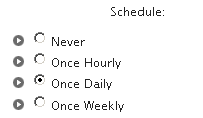
- Tip: Use a combination of scheduled daily (or hourly if you post more often) backups to email and make manual backups anytime the database may be affected by your upgrades or customizations.
Shared Host Backup Options
If you are on a shared hosting plan, you might have access to tools like CPanel. Utilize the backup options available with it to backup your MySQL database containing WordPress tables.  CPanel 1.0 (RC1) provides a backup wizard that makes this task easy. It also has ‘Cron Jobs’ facility for the brave which basically lets you schedule commands you want to run. My experience is with linux hosting and it may be different with a Windows server.
Backup Your WordPress Files
WordPress files is the meat of your blog. This is where you tweak index.php files, upload plugins and themes to wp-content folder and come very close to breaking the well written application with your PHP code adventures.
But, you don’t really break it because you have backups. Right?
Use FTP (SFTP)
You can use FTP to download your WordPress files to your computer. You can zip up the downloaded WordPress directory and email it to your GMail account to keep all your backups together. If your provider has SFTP option, use this secure option instead to access your files.
If you had SSH access (sometimes you have to request it to get access even if you are paying for it), you could zip your files locally on the server and then use FTP to download which will be faster due to smaller size of your backup.
Use CPanel Automation with a script
If your host provides CPanel for administration and if cron jobs are enabled, you can automate the backup and ftp to a remote server with this script. Matt at eJabs pointed this out a while back and I have since used this useful script by V-nnessa.
Online Blog Backups
Blog Backup Online (Beta)
If you found the above methods tedious or just felt like it was a whooosh over your head, no worries.
You can let Blog Backup Online take care of your backups for you. You simply provide your blog URL and your blog posts including comments are automatically backed up everyday. No software. No ftp. No con jobs. 
This service is free while it is in beta and I have had this service going since May 7 2007 and have used just 2.5MB out of 50MB provided with the Basic account. This is nice to have especially while it stays free.
Tip: Their FAQ says they don’t backup pictures and videos right now and that feature is coming soon. If your pictures and videos need to be backed up, the Basic 50 MB account may not be for you.
Check here for Webware Review of Blog Backup Online.
Let’s hear how the blogging community here manages their backups even if you don’t use WordPress. I am sure we are about to find a lot of interesting tips and tricks and I can’t wait to learn some from the discussion that is about to ensue.
I write about more technology related topics at ShanKri-la – where technology meets daily life!. My goal is to make your life on the Internet a little bit easier, a little bit manageable and a little bit more enjoyable.
6 Firefox Add-Ons That Boost Productivity
Perhaps you’re doing research on a new topic for your blog. Maybe you’re doing some shopping and you want to keep careful notes on how a product compares to another. Better yet, you could be planning a vacation (I’ve heard of those; they’re something I need to experience more often). 😉
Here are six ways you can keep yourself organized when taking notes on Web pages.
1. Diigo
More than a note taker, it’s really a bookmarking powerhouse with note-taking capabilities. When you’re on a Web page select the text/image you want to highlight and click the highlight button on your Diigo toolbar. Doing so will highlight that content as well as keep a copy of it in your Diigo account. You can also add sticky notes to any content on a page. The next time you return to that page, there will be your notes as you left them, so no need to figure out where you left off. What was it about that content that caught your interest? Say goodbye to the post-it notes on your monitor and say hello to Diigo. 🙂
2. Google Notebook
One I use all the time to remind me of blog article ideas, or to keep track of my next Drum Corps candidates, Google Notebook fits snuggly in your Firefox browser and waits to be activated. Just select the content on a page, and “clip” it to your account. Comes in handy when I’m at work and want to make a note to myself for when I get home.
3. Internote
A simple, but effective way to manage notes on any Web page you view. Just like Diigo, but much more simplified in that it keeps your notes on the page when you return to it. No bookmarking, just notes.
4. Dappad Notebook Sidebar
This little baby let’s you keep all sorts of content in your Firefox sidebar. You can even share the information you save with friends, make private, or share with the public at large. It even keeps the text saved in rich format. Copy from Word or Excel and put it in here if you wanted. The tagging feature makes for quick finds in your content.
5. MyStickies
A colorful way for you to add your notes in boxes all over a Web page. Move them around to your liking. Return to that page, and your notes are waiting for you.
6. Notefish
Easily do the same as above, but the information is collected on your account page instead of on the Web page you’re on. Once there, you can rearrange your stuff, colorize for easier sorting and more.
All of these are free and require an account.
Top 25 Blogs About Blogging
When I first launched Blog about your Blog in late November of 2006, I just wanted a place for bloggers to come together and promote their own blogs. I soon found out, as our contributors have also, that the best way to promote your blog is to write great articles and intrigue the reader. This will basically lure them to their blog for more great reading.
Blog about your Blog has evolved into a successful community blog that shares, blogging tips and blog tools, website traffic help, RSS feed information, and much more.
Since becoming a blogger I have really wanted to become the “A List” type, as many other bloggers do. With as much success we’ve had, BAYB is still really in it’s infancy especially compared to a lot of the bigger name blogs out there.
To make a long story shorter, Blog about your Blog is making it’s own claim to fame. Daily Blog Tips has put together a ranking of the Top 25 Blogs about Blogging. The list ranks the blogs according to their google pagerank, alexa rank, bloglines subscribers, and technorati authority.
Blog about your Blog ranks in a tie as the 20th top blog about blogging. If you haven’t seen the list it has some great blogs listed. Obviously, because they are supposed to be the top 25 blogging blogs!
You better believe we will continue to climb the ranks.
Last Contest Update
With only a few days left in our Laptop Briefcase Contest, we currently have 15 entries. I’m hoping for at least 5 more entries. Remember, the bag is valued at 180$, the chances are pretty good to win such a valuable bag.
To enter the contest all you have to do is link to Blog about your Blog and our sponsor. See the contest post for more details.
The contest ends next tuesday august 7th.
Eco-Handbags has been great for sponsoring our competition. They are currently offering 20% off on their products. Sale ends August 10th. They really gave some great stuff. 20% off plus free shipping to Canada and the US.
Comment Friday Winner: ChrisBlogging
This weeks topic was about disclosing your earnings and stats to your readers. I may start disclosing my earnings made from my other blogs as well, but I haven’t decided on that yet.
A blogger that I have seen around lately has released their own earnings. ChrisBlogging writes about blogging for cash and freelance writing. Through freelance writing he reports he earned 4,894$ in the month of July. Quite a nice total.
For those interested in freelance writing he suggests using the job boards at freelancewriting.com and journalismjobs.com. I have used freelancewriting.com and actually contacted several people about ‘working‘ for them and have received a positive response. Blogging is basically freelance right?
Thanks chris for the helpful tips, and I will be back to your blog again and again. Find me a job?