
Three Steps to Keeping your RSS Feed Readers
Once a reader subscribes to your blog, it is your job as the blogger and author to keep them interested and engaged in your content. They obviously subscribed for a reason, so you have to keep them coming back. There are a few ways to do that.
Daily Content
Offering daily content is definitely the best thing to do, to keep a RSS feed reader. Once you publish an article that information is sent to them via email, feed reader, blog lines, whatever they subscribed with. The more you publish the more they will come back to your feed. Trying to average a post a day is very good practice. If you can’t do that participate in meme’s or perhaps Blog Roundups where you link to other blogs.
Offer a Full RSS Feed
I usually unsubscribe to a blog only offering a partial RSS Feed. I subscribe to blogs via RSS feed for the ease of it, not to visit a blog after reading half of an article. Blog about your Blog offers a full rss feed.
If you want me to visit your blog, offer a Full RSS feed, and an engaging article. Or simply, offer incentive.
Incentive?
In previous articles I have stressed how important it is for a blog to have incentive. Incentive for a reader to continue visiting your blog. There are millions of blogs on the internet, why is yours better?
Offering incentive to your readers is pretty easy once you figure out what it is you want to give. Whether it’s free links, prizes, money, advertising or participation on their blog, you can really start building more readers.
For example our comment friday gets 10-25 comments per friday generally. The incentive for commenting? A free link. I chose one comment and link to that persons blog. They get put on our blogroll for a week and get mentioned in an article. By offering incentive, we get several bloggers who come back each and every friday, sometimes before the article is even published!
If you follow those three steps not only will you continue to keep your RSS feed readers, you will continue to build your readership base.
While setting up your blog site, paying proper attention to the general website design is very important. A simple layout helps keep the RSS readers and saves their time and effort. For a novice, learning the web design basics is not any tough with the help of online tutorials and well-read web design books.
Comment Friday Winner: Shankri-la
This week I have chosen K-InTheHouse from Shankrila as our comment friday winner! I tried to check to see if they had won before, but I don’t think so. Surprising though, K-InTheHouse has been participating in Comment Fridays for some time now. He has also become our newest Blog about your Blog author so I saw it fit to declare them as the winner. A great way to announce an addition to the team. He should have an article up Sunday Evening, so be ready for that.
I hope everyone had a happy 4th, even if you aren’t from the U.S and don’t celebrate it. We’ve been pretty busy for the week, but I have an article about keeping your RSS feed readers for later today. The entry will also be entered in the Daily Blog Tips “three project”.
Comment Friday for July 6th
 It’s Friday already and here I am late again on Comment Friday. Last week I offered anyone who commented, that I would subscribe to their RSS FEED.
This week I am interested in knowing what you did on July 4th this year. I’ll tell you what I did in the comments. It was my 2 year old son’s first firework show!
I will also visit your blog and stumble it, so hopefully you will get some additional traffic! Free traffic for commenting! Can’t beat that.
Hope everyone had a great and happy 4th, let’s get to the comments!
How to Blow Up Your Blog . . . and Live to Blog About it!
OMG! What a terrible time I had with my blog today!!!
Ironically, I was reading the previous post on BAYB about the TITLE tag. A word to the wise, don’t mess with your permalink structure unless you know what you’re doing.
Long story short, I had to basically start fresh with WordUp. After much stress and blindly tyring whatever I could, I survived and think there is a happy ending to the story. You can read more here.
But Gary, I must confess: while your post was the trigger, the gun was loaded much before your inspired me to try something I had no business doing. 🙂 Believe it or not, I still plan to revisit your advise at some point!
What Is The Title Tag In A Blog
WordPress is a very powerful program. Out of the box it rocks! But with a few minor modifications WordPress can be a search engine magnet.
Matt, this post is actually for you. I read your June Income Statement and I want to help you make more money with your blog. Cheers, and I wish you the best. Here are some optimization tips that I think you or any blogger running self hosted WordPress can use. These tips will increase SERP traffic. 🙂
There are a ton of things that I can help you with… I am looking at the SERPs and your robots.txt and see a million things that can be done differently… all to help you and BAYB.
But, I don’t want to write a novel… so lets take things one at a time… I will try to come back and post more tips as often as I can. For now, there is one thing that you can do that will help your listing in the SERPs. And that is making better use of the <title> tag.
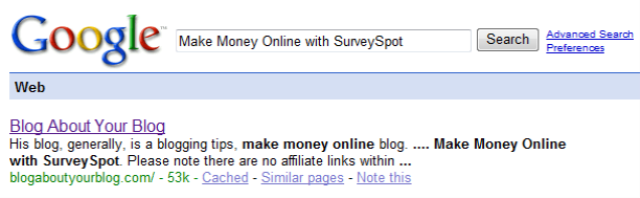
If I use Google and search for Make Money Online with SurveySpot, your site pulls up first, which is GREAT! Nice work…
But, unfortunately, look at your title in the SERP. It says Blog About Your Blog. Now, granted… you are going to get some clicks from being listed here in the SERPs. However, remember what the person is searching for: Make Money Online with SurveySpot.
Now, unfortunately, I was digging for many different title post searches on Google and couldn’t find any of your individual post pages. That’s a different story… but lets assume that the result above was linked to your actual POST PAGE and not HOME PAGE…. which again… ideally this would be the case and would be even more optimal… but again, I can help you with that in a separate article… for now, I want to show you how to change your title tag.
Ideally, in this situation, you would rather your title in the SERPs to match the title of your POST. Right now they do not:
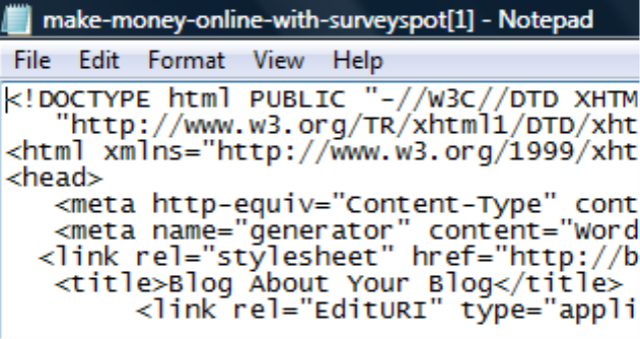
and…

In your current Wordpress theme, in your header.php file you can change your <TITLE> tag to say something unique for every section within your site, including your individual post page.
Ideally if you write a post titled, Garry Conn Is Cool… you would want the <TITLE> tag to say the same thing, they way when someone uses a search engine and types, “Garry Conn Is Cool” in the search bar, your individual post that is titled, Garry Conn is Cool, is displayed in the SERPs as Garry Conn is Cool.
Here is the PHP code that I have written on one of my very popular blogs:
<title><?php if (is_home()) { ?><?php bloginfo(‘name’); ?><?php } ?><?php if (function_exists(‘is_tag’) and is_tag()) { ?>Articles, news and information about <?php echo $tag; ?>.<?php } ?><?php if (is_single()) { ?><?php wp_title(”); ?><?php } ?><?php if (is_archive()) { ?><?php wp_title(”); ?><?php } ?><?php if (is_page()) { ?><?php wp_title(”); ?><?php } ?></title>
Now, if we break this code down, it basically says:
Hey, if this is the home page… display this.
If this is the category page, display this… etc, etc, etc.
Let’s Break it Down !!!
<title>
<?php if (is_home()) { ?><?php bloginfo(‘name’); ?><?php } ?>
This says, If this is the home page, please display my blog site name. In your case, Blog About Your Blog.
<?php if (function_exists(‘is_tag’) and is_tag()) { ?>Articles, news and information about <?php echo $tag; ?>
This says, if you use UTW (Ultimate tag warrior) display the following text, “Articles, news and information about the TAG NAME. You can change the text to what ever you want. Such as:
<?php if (function_exists(‘is_tag’) and is_tag()) { ?>Blog About Your Blog Blogs About <?php echo $tag; ?>
This says, Blog about Your Blog Blogs About TAG NAME. Tag name would be the tag you assigned. Snow flakes, money, food, etc… whatever…
<?php } ?><?php if (is_single()) { ?><?php wp_title(”); ?><?php } ?>
This says, If the page is the individual post page, please display the title of the post. *This one here is the reference to what I am talking about in this article.
<?php if (is_archive()) { ?><?php wp_title(”); ?><?php } ?>
This says, if the page is the category page, please display the category name as the title. Same too if it is the archive by date, day, year…etc…
<?php if (is_page()) { ?><?php wp_title(”); ?><?php } ?>
</title>
This says, if the page is a page like the contact page to please display the page’s title. (i.e.: Contact Blog about Your Blog)
If you add this code to your header.php file replacing what you have now… you will see an increase in traffic from the SERPs because you have made your listing more appealing.
Best of luck… I wish you and your family well. And I hope to see July be a better month for you! We bloggers bust our asses and I only wish I could see everyone find success.
I want to help you with your robots.txt file next… but for now I must leave with what I have posted so far. Again good luck and I wish the best for you. I am so excited to see how well the blog is doing… and with a few added touches and minor modifications we can all get this site shooting off like a skyrocket!
Purely Blogging
Pure Blogging is a blog that I often visit. I like participating in their posts as well as getting a few weekend links.
First impression
 My very first impression was that it was a great domain name and clean theme. Not heavily monetized, but the regular google ads. After reading a bit, I was kind of lost. I saw several authors on the sidebar, but no way to join, or even mention about it. I would definitely be interested in guest blogging if I knew how (and if I was welcome).
Pure Blogging Give Back to Their Readers
I took a few days before completing this review, and I am glad that I did. Just as we have our Comment Friday, Pure Blogging does it a bit different.
“Every Friday, I reward the active members of this community by featuring an interesting post from the top commentators.”
Not only do you get a free link, but he also stumbles your post! Weekend Links are a great idea.
Popular Posts
Pure Blogging is obviously about blogging. If you want some blogging tips I definitely suggest you start at the June Roundup where the most popular posts for June are posted. There also is a Top Posts section that is the most popular posts including different categories, very well organized.
What’s Their Incentive?
A good blog gives the reader incentive to participate and read their blog. Not only should you be active at pure blogging for “free links” but there is a contest.
200$ Cash Giveaway!
The person who leaves the 1000th comment will win 100$ cash by PayPal. Pretty easy right? Good luck.
The second part to that is linking back to the contest. One lucky person who blogs about the contest will be win, lottery style.
The contest will end when the 1000th comment is received, which is projected to be in the next few days. If you enter make sure to post that you saw this on BAYB.
I’ve already subscribed to this blogs RSS feed, why don’t you? 347 other people have!
June 2007 Earnings
Last month I started posting our earnings made from this blog. We earned 139.84$ from various services, many of which we earned money with again this month. I calculate earnings by money earned from that month, not necessarily paid. This month we saw a significant dip in our earnings however, some review money was made at the end of may, and now at the beginning of July. I have some pretty big plans for advertising etc, so you should see some major improvements in the following weeks.
Adsense 2.70$
Text Link Ads 15.70$
ReviewMe 23.00$
PayPerPost 10.00$
Sponsored Reviews 32.50$
Auction Ads 5.00$
RSS Feed Ads 6.00$
The grand total only comes out to be 95$. However, if you factor in the contest that this blog won on Blogging Tips, that number increases quite a bit (70$).
Advertising space on this blog is available. If you don’t want to go through Text-Link-Ads directly, I can sell advertisement separately.
Blogroll space is 10$ per month, we are not currently exchanging links at the moment. Another option is our RSS Feed. I charge only 6$ a month to have a link there with whatever text you would like. We generally have 170+ subscribers.
Please use the contact form if you are interested. Thanks
The dreaded edit
I stumbled across a simple way to perfect your blog material, and in the process, determine whether what you set out to do has been achieved. Additionally, if you see yourself wandering, it is a chance to bring yourself back on track.
Essentially, you go back to your first post, read it über critically and then start editing, fine-tuning, and honing any points that you were trying to make. I guarantee that with the benefit of hindsight, some ideas won’t appear to be quite as neat as you perhaps thought they were back in the day ie You missed out the punchline, or referred to the salient point as IT without ever telling the reader what IT is!
If you are any sort of conscientious writer, initially you will be fretting as you edit! Did I really publish that? Did people really read that? Sorry, this is one of those No Pain No Gain deals!! But relax, the past is the past, and now is a chance to get down to work and get a second bite at the cherry. Remember, “all” you have to do is focus on a weaker (or could do better) post and “polish” it until it emerges strong, direct and all being well, freshly embellished with uptodate info, or new points of view that have been developing in your mind since those early days.
On the plus side, not everything you wrote was weak, so you don’t have to alter the entirety of your material. The downside of this operation, from my recent experience anyway, is that it will be mentally tough, going over some old ground and critiquing yourself, so don’t expect to rattle through all your posts in a few minutes.
And when you are happy with post one, I bet it has enough alterations to merit being re-published as an update. Why not? If that revise and update tactic is good enough for The Motley Fool, it is good enough for anyone.
And don’t stop at one edit, because another upside of this horrible process is the chance to ensure that your posts as a whole are focussed in the right direction. You can spot trends, decide whether you like them or not, and act accordingly. (Is the personal stuff dwarfing the business side of your business blog, do you repeat certain phrases or words ad nauseam? etc…) Therefore, work your way diligently from the darkest past back to the present and a light tight ship should be yours.
If you are cringing at the thought of doing the edits on top of normal blogging duties, I repeat, some of these edits will end up so drastic it shouldn’t be an issue re-publishing them – which in effect requires less work from you overall. It is just a lot less fun than dreaming up a brand new post out of nowhere.
I just practiced what I preach with a few from my stable of 250 techie posts, One, an article on iPods and other gizmos on armbands made me cringe. Re-reading it, the post from last October was OK, but, with the dust settled, it didn’t strike me as fluid or particularly witty. Taking my time, detached, a bit more experierenced, I was able to tighten up the flow and then add a couple of geriatric pickpockets into the mix, and I think it worked quite well. (Maybe you think the revision needs editing / rethinking too, but I can’t stand the thought of fiddling around with that article any more, so it will stay untouched till Revision 3!)
In conclusion, the message is, use what you got and make the best of it. No point discarding or ignoring anything, because all your work has some merit, and the dull bits only require a polish now and again to become gems. It is doubtful whether anyone else will enlighten you about the specific shortcomings you are going to find while editing your material, so the choice to act and edit your archives really is down to you.
As a side note, in the last post here, I was suggesting you communicate with bloggers you have referred to in past posts. I started doing exactly that and have had a couple of positive responses, and been ignored by a couple too, so don’t be put off saying hi, and find out where you stand.